For warehouses & 3PLs · Pilots open

Shipmate · Warehouse management Every unit, from dock to door and back. Running smarter every week.

Shipmate is a warehouse management system for receiving, putaway, inventory, picking, packing, shipping and returns, with optimizers that choose slots, routes, lanes and cartons, robotics under the same roof, partner and carrier integrations, and analytics that A/B test every algorithm before it reaches your floor.

Contact us for pricing Priced for your business. Ask us

  • Inbound, outbound & returns in one
  • Optimized putaway & pick routes
  • Conveyors, cubes & robot arms
  • Self-hosted
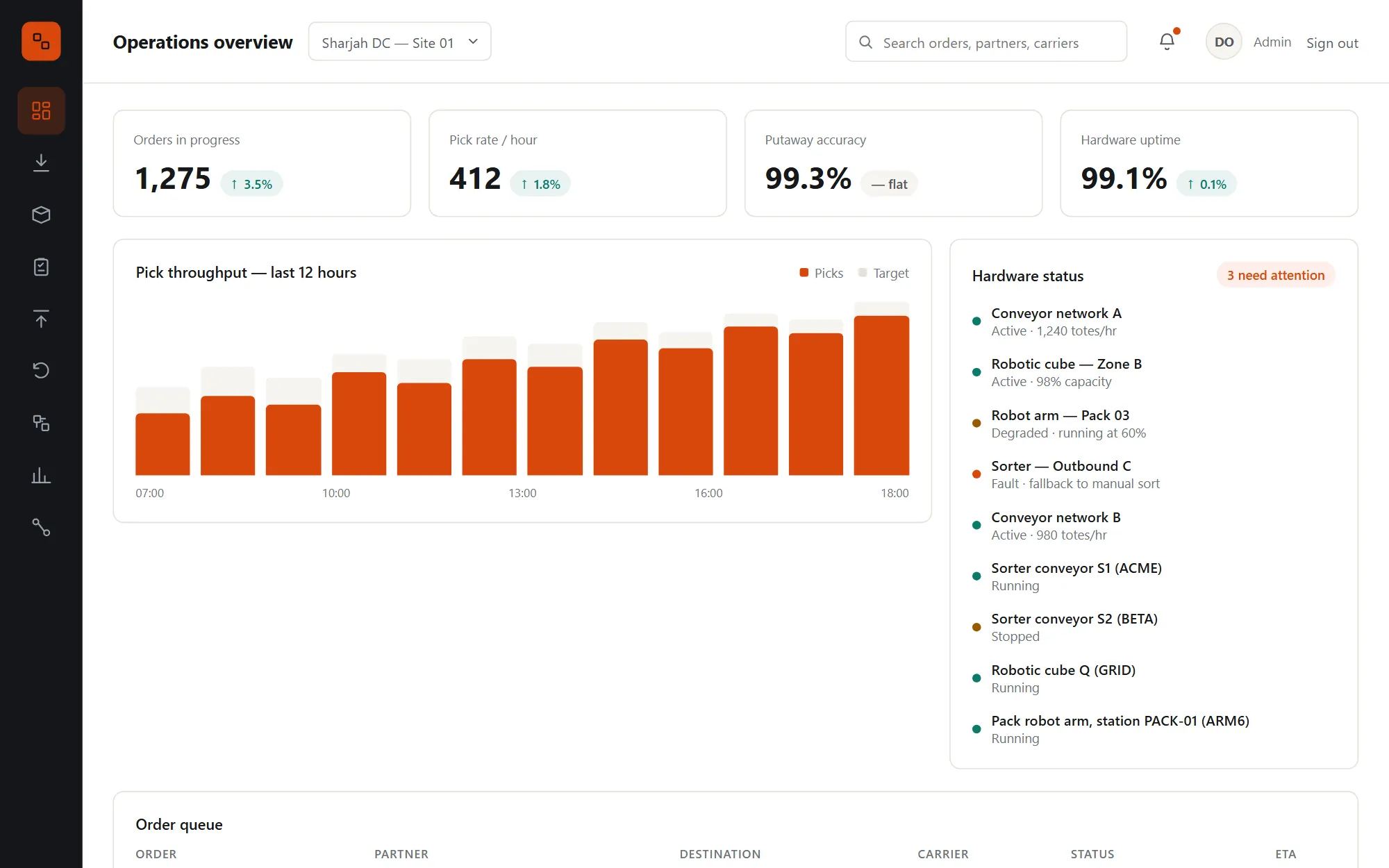
The operations overview: orders in progress, pick rate per hour, putaway accuracy and hardware uptime, pick throughput for the last 12 hours against target, and the status of every conveyor, cube and robot arm
Less walking per pick list
31%
Sort decision, p95
0.5ms
Return grades
5
Robot classes
3

Warehouses outgrow their WMS

The cost hides in walking, searching and waiting.

Most warehouses run on a system that records what happened but decides nothing. Shipmate decides where stock goes, which route to walk and which lane to use, keeps the records exact, and connects the machines to the same system.

Stock the system can't find

The pallet is in the building, but the screen says it isn't. Every miscount turns into a short pick, a held order and a supervisor walking the aisles.

01

Pickers walking the long way

Pick lists in location-code order send people up and down the same aisles. On a busy shift, that walking is most of the labour bill.

02

Returns nobody can trace

Boxes come back with no paperwork, sit in a corner for weeks, and nobody can say what each one is worth to the partner who wants a refund.

03

Robots on an island

The conveyor, the cube and the robot arm each run their own software. When one stops, the WMS doesn't know and keeps sending work into a dead end.

04

From the dock to the customer and back

One flow, one system.

  1. 1
    Receive

    Against the supplier's ASN, or blind when there isn't one. Damaged units go to quarantine, and good units go straight to orders already waiting for them.

  2. 2
    Store

    An optimizer picks the slot, or splits the pallet across several, by velocity, travel, consolidation, hazmat and cold-chain rules.

  3. 3
    Pick, sort, pack and ship

    Waves by priority and carrier cutoff, routes that walk less, lanes per carrier, cartons chosen by the optimizer, labels and customs paperwork bought at packing.

  4. 4
    Return and learn

    Returns are graded and restocked or written off with a full trail. The analytics measure every algorithm and test each change before it reaches the floor.

What's included
  • Receiving & ASNs
  • Blind receipts
  • Cross-docking
  • Putaway optimizer
  • Inventory ledger
  • Search
  • Cycle counts
  • Discrepancies
  • Wave planning
  • Pick routing
  • Sortation
  • Cartonization
  • Shipping & manifests
  • Order tracking
  • Returns & grading
  • B-stock
  • Conveyor sorters
  • Robotic cube
  • Robot arm
  • Predictive maintenance
  • Partner API
  • Webhooks
  • EDI over AS2
  • Carriers & customs
  • Analytics
  • A/B experiments
  • BI access
  • Scanner API
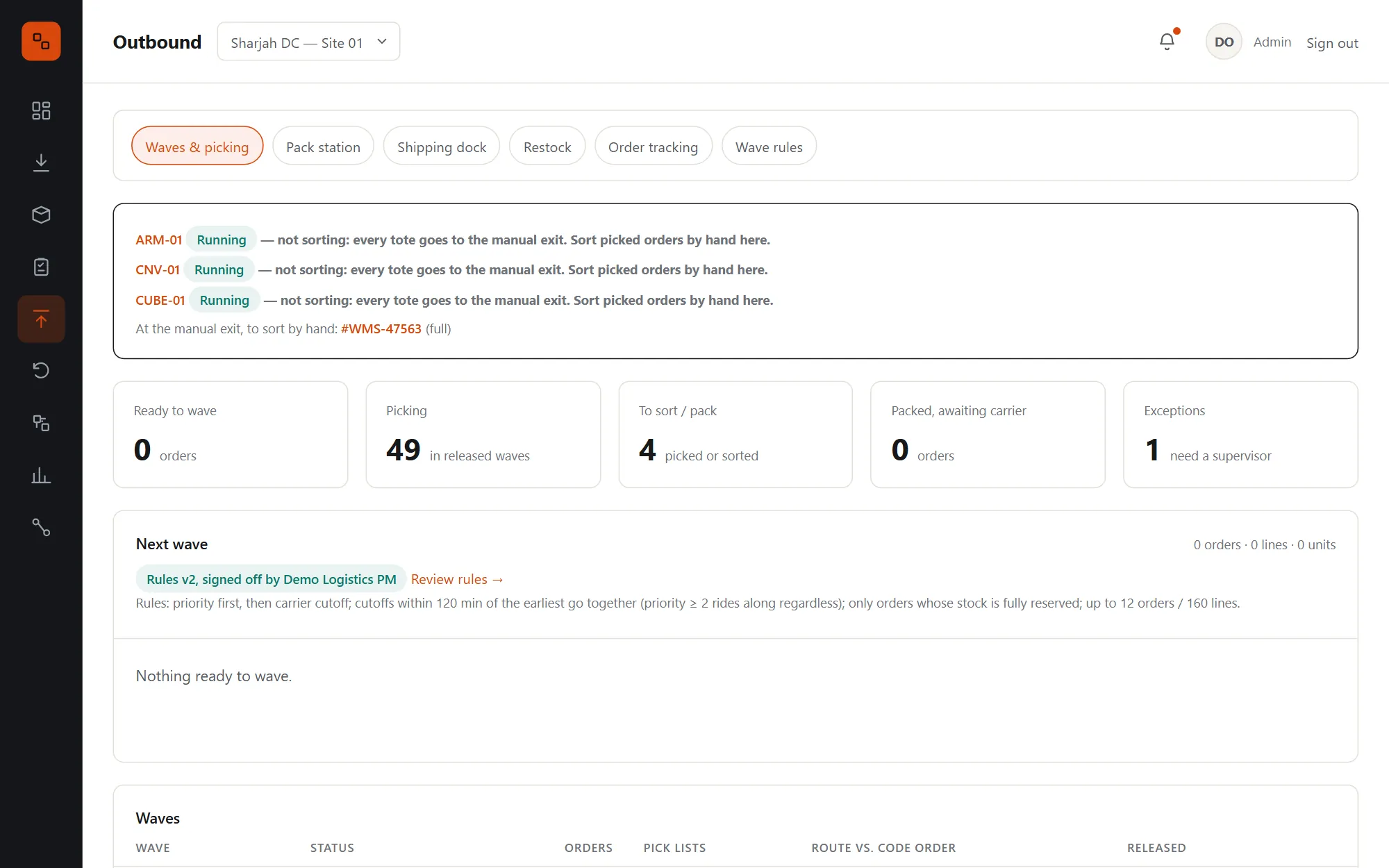
The Outbound page: orders ready to wave, picking, at sortation and in exception, the next wave preview with the rules in use, and the released waves

For the floor, the office and the machines

Everything a warehouse does, done properly.

Every screen below is from Shipmate itself, running its demo site.

Receiving & cross-docking

Every pallet in, counted and placed, in one pass.

Receive against the supplier's advance shipping notice line by line, with lot, expiry and licence plate. Stock that open orders are already waiting for goes straight across the dock to them, and only the rest goes to storage.
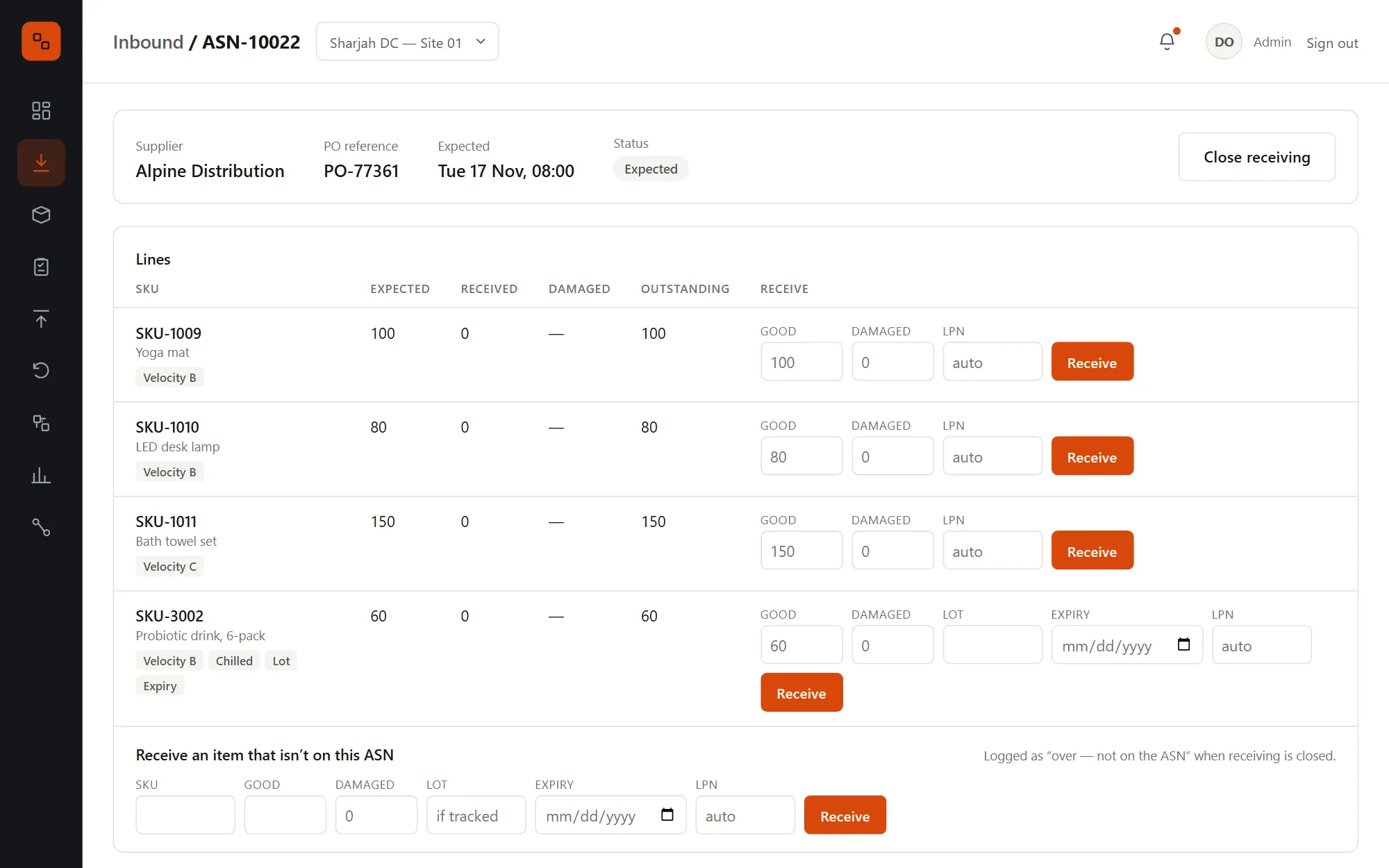
  • Damaged units go to quarantine with a discrepancy; lot and expiry are required for SKUs that track them
  • A licence plate (LPN) is generated when none is scanned
  • Cross-dock first: waiting orders are served earliest ETA first, in the same transaction, so two receipts can't claim the same demand
  • Blind receipts for deliveries with no ASN, and items that aren't on their ASN, each logged for someone to match to a PO
  • Closing an ASN compares received with expected and logs every over and short
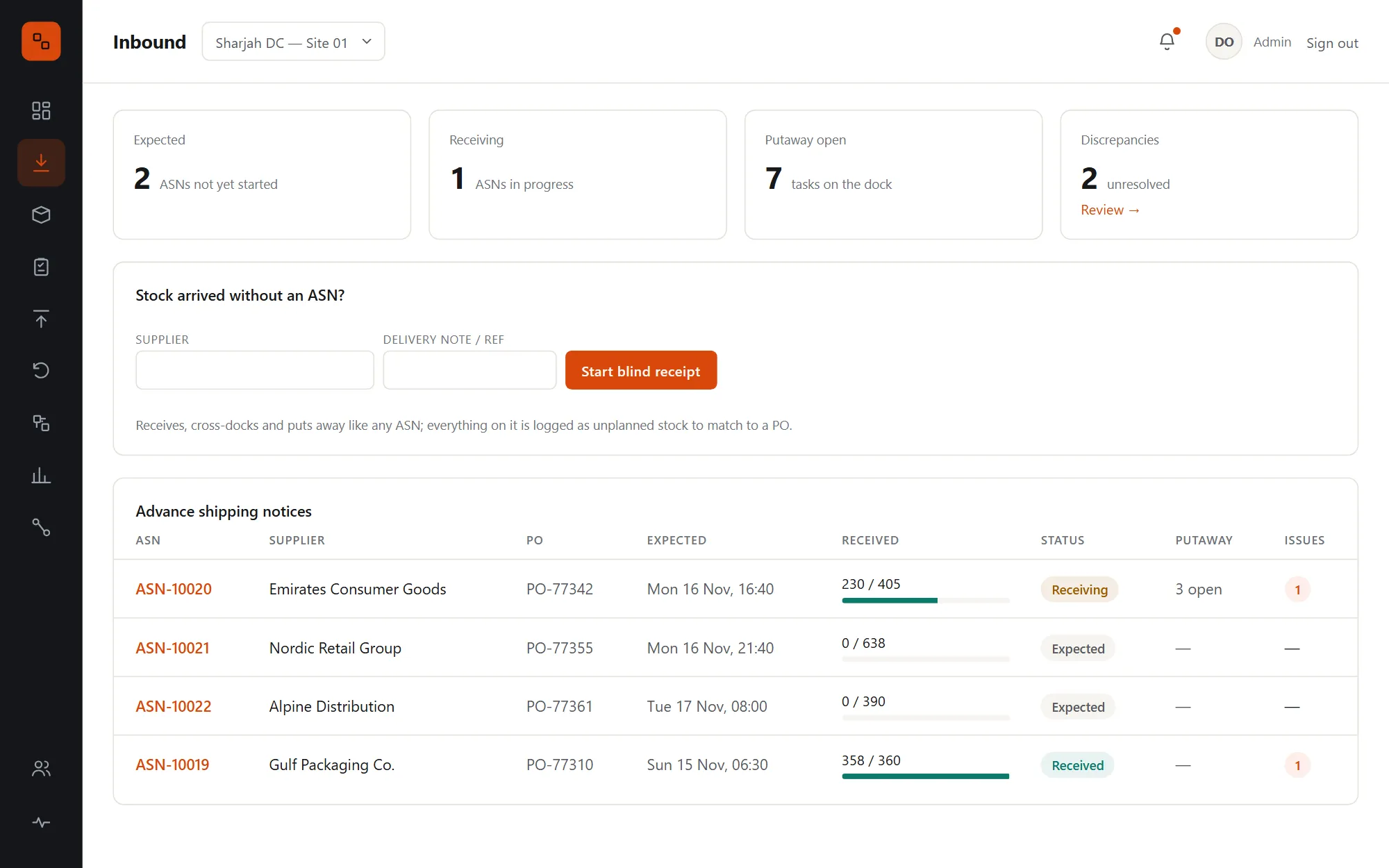
The Inbound page: ASNs with their supplier, PO, expected time, a progress bar of units received and their status, and a form to start a blind receipt
An ASN being received: each line with expected, received and damaged quantities, lot and expiry fields and a Receive button

Putaway optimizer

The best slot for every pallet, or the best four.

An optimizer service scores every location with room: velocity match, travel from the dock, consolidation with the same SKU and best fit, after the hard rules for capacity, hazmat and chilled storage. When spreading a pallet scores better, it plans a split across up to six slots.
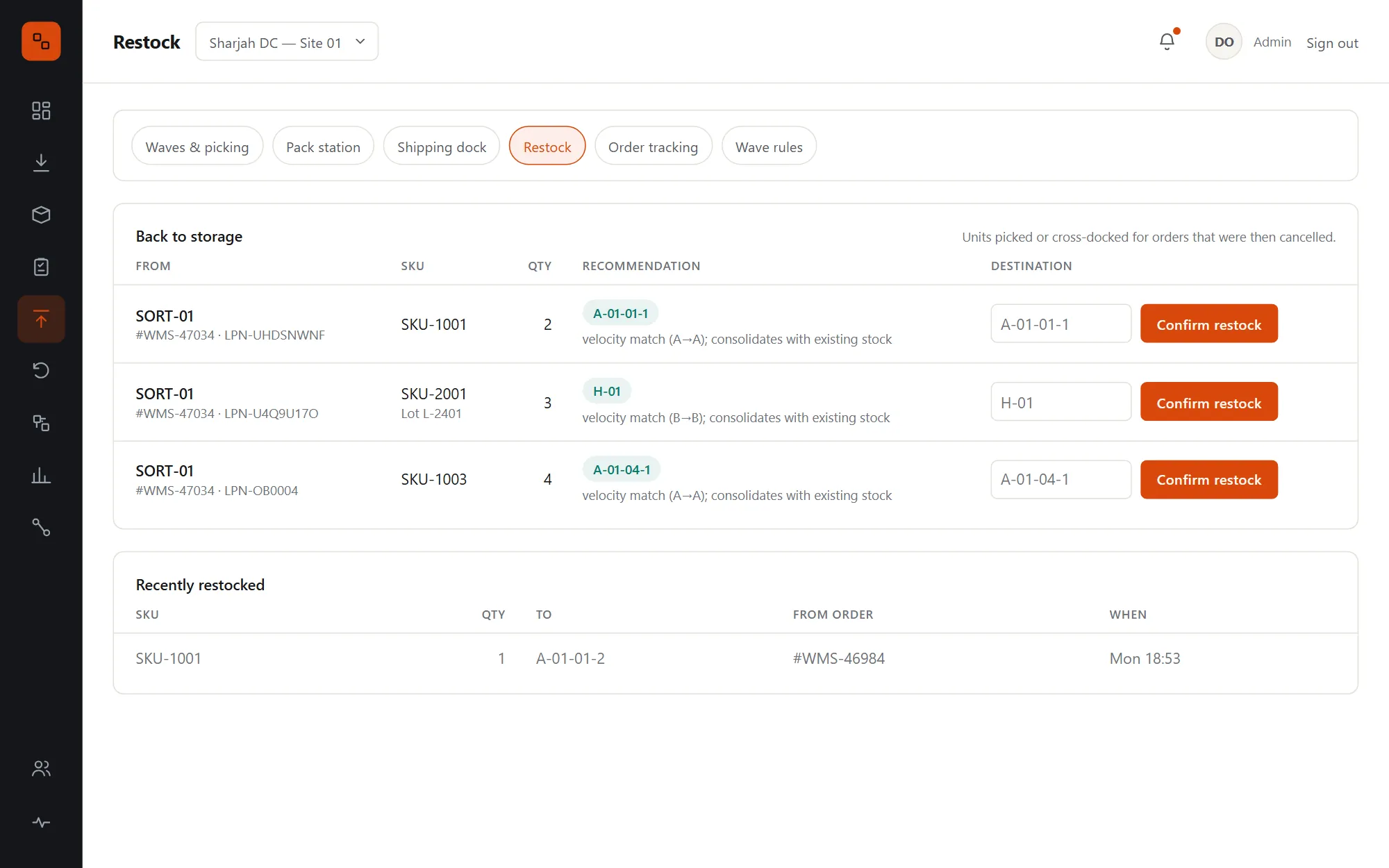
  • The plan is reserved under per-location locks, all or nothing, and re-planned once if a slot fills in between
  • Operators confirm at the recommended slot; supervisors can send it elsewhere, and overrides still pass capacity and segregation checks
  • If the optimizer is unreachable, the task waits with an "Ask again" button, and manual putaway keeps the floor moving
  • Returned and B-stock units are placed by the same optimizer, with their grade as an input
  • Putaway accuracy is a tracked KPI: the share put away where the optimizer suggested
Restock tasks: units from a cancelled order going back to storage, each with the optimizer's recommended slot and the reason, and a Confirm button

Inventory ledger & search

Stock that adds up, because it can only be written one way.

Every movement is a row in an append-only ledger: receipts, putaways, picks, packs, adjustments and returns. On-hand stock is the sum of those rows, so the history and the balance can never disagree.
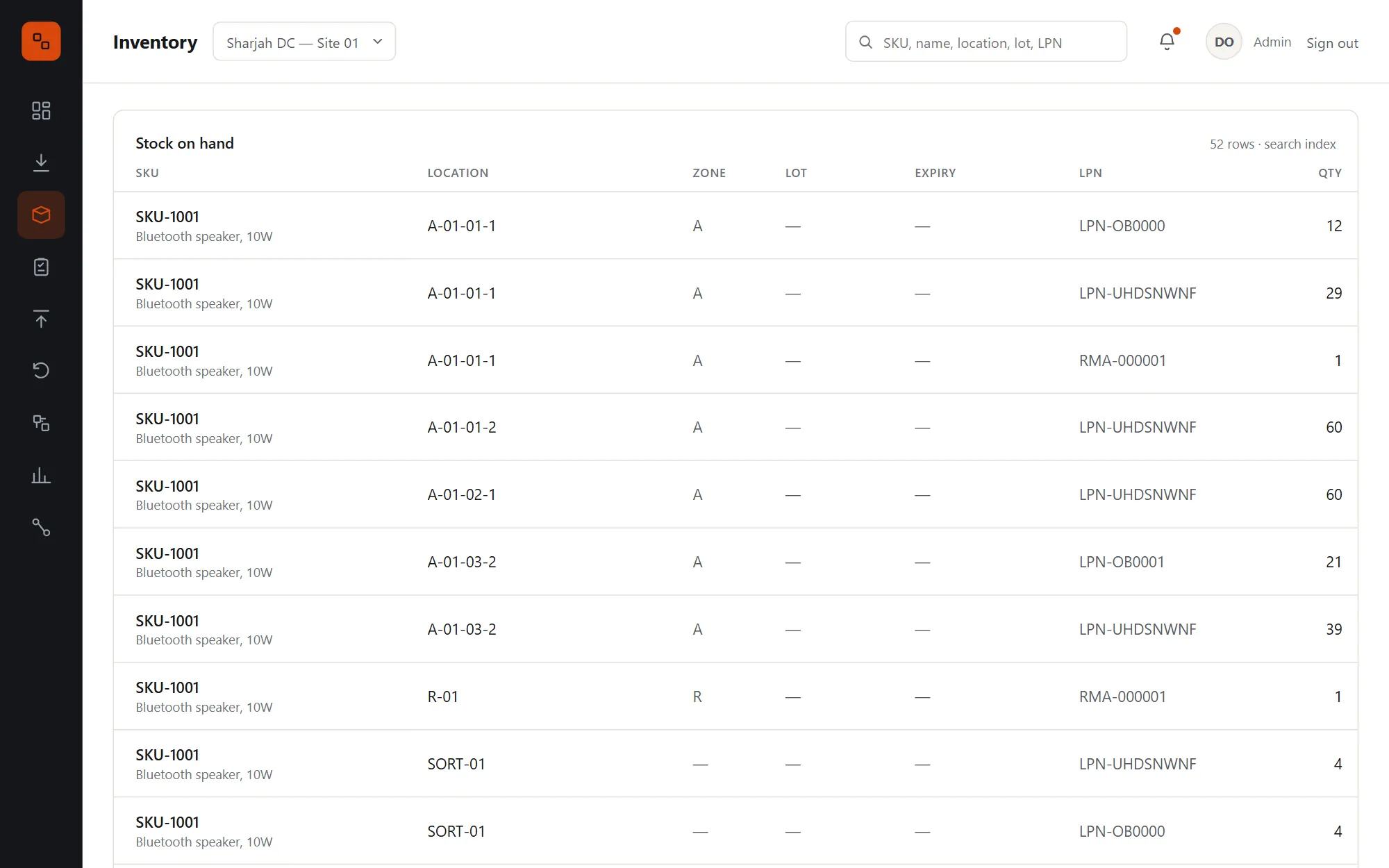
  • Rows are never updated or deleted; the legs of one operation share a group, so every move can be followed
  • On hand by SKU, location, lot, expiry and licence plate
  • A putaway is searchable in under a second, through Elasticsearch
  • Search falls back to the ledger in the database if the search engine is down
  • Every movement publishes its event through a transactional outbox, so nothing is lost if the message broker restarts
Inventory search: stock on hand by SKU, location, zone, lot, expiry and licence plate, with a search box for SKUs, locations and LPNs

Cycle counts

Blind counts that keep the ledger honest.

Policies set how often each location is counted, by zone and velocity class. A daily job raises the counts that are due, most overdue first, and the counter sees what to look for but never how many the system expects.
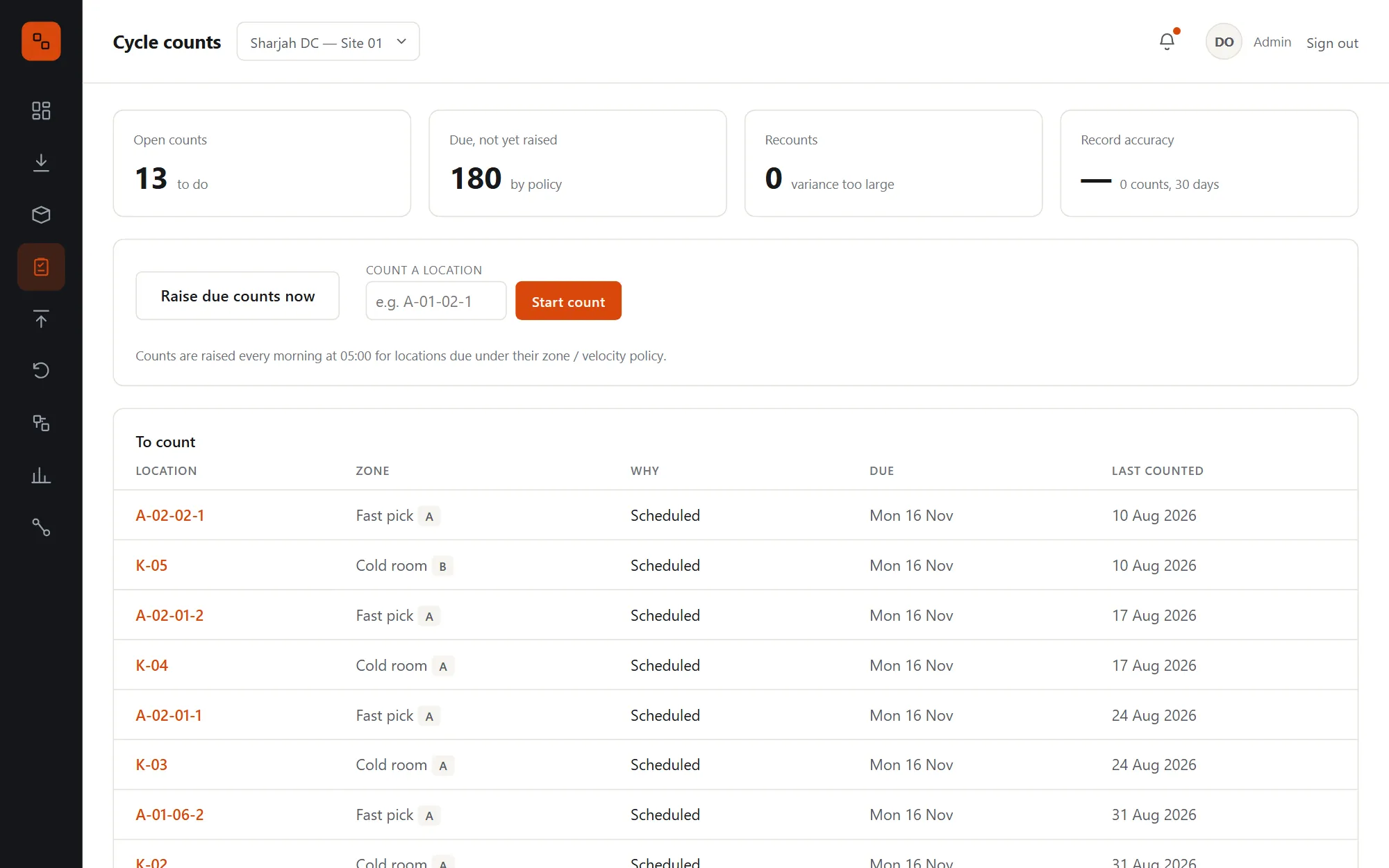
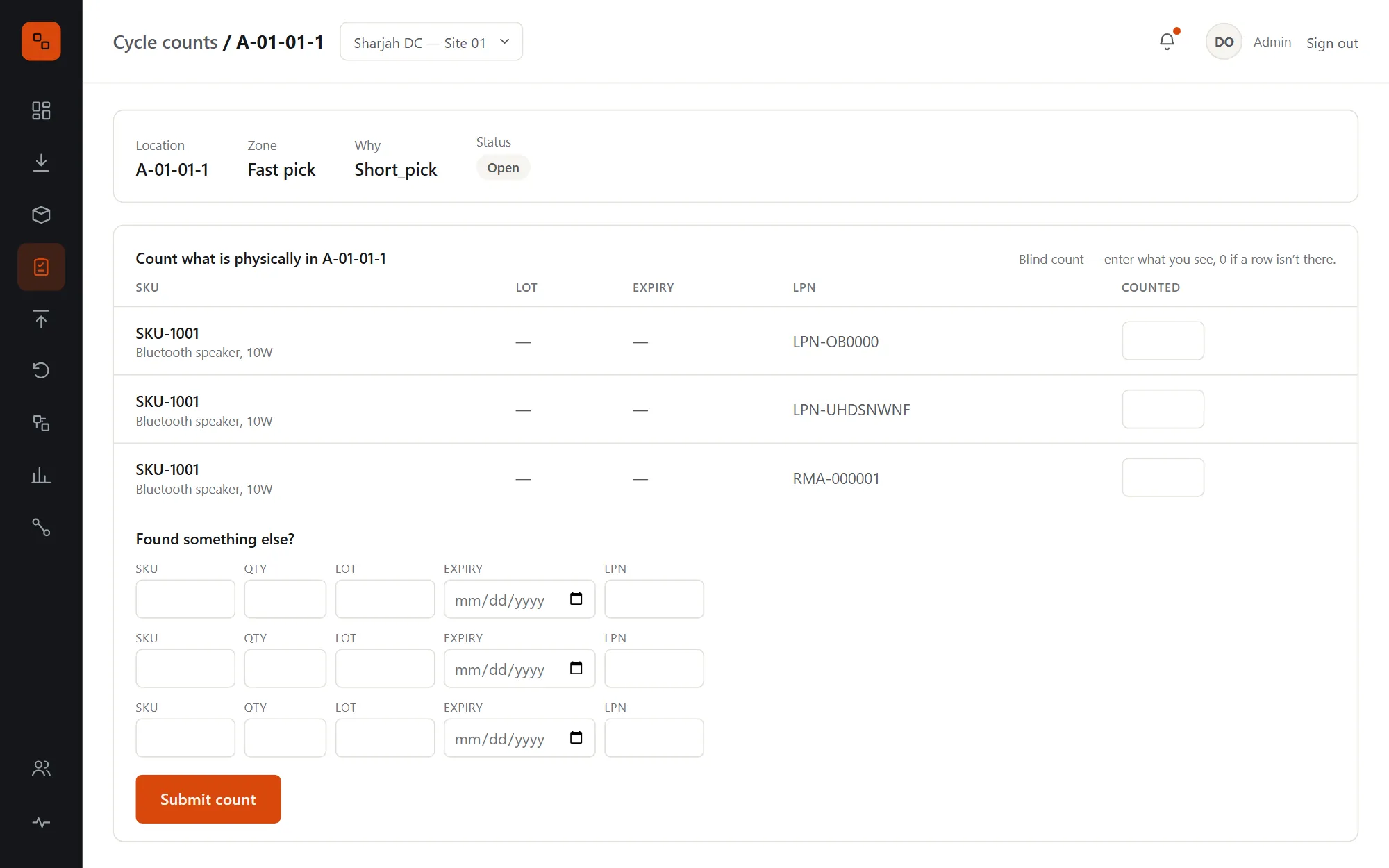
  • Count policies from the most specific rule: zone and velocity, zone, velocity, site default
  • Exact matches complete; small variances post as adjustments; large ones raise a recount
  • A recount must be done by someone else, so a miscount can't confirm itself
  • If stock moves mid-count, the count is refused and redone, so a putaway is never booked as a variance
  • Record accuracy: the share of first counts in 30 days that matched exactly
Cycle counts: open counts, counts this week, record accuracy and the list of locations to count, with Raise due counts now and Count a location
A blind count of one location: the SKUs, lots and licence plates expected there, with empty quantity fields and rows for anything else found

Discrepancy resolution

Every over, short and damaged unit, closed with a reason.

Supervisors resolve each discrepancy with an action that fits its type, and the stock follows: damaged units are written off or returned to the vendor, overs are accepted or sent back, shorts become supplier credit claims.
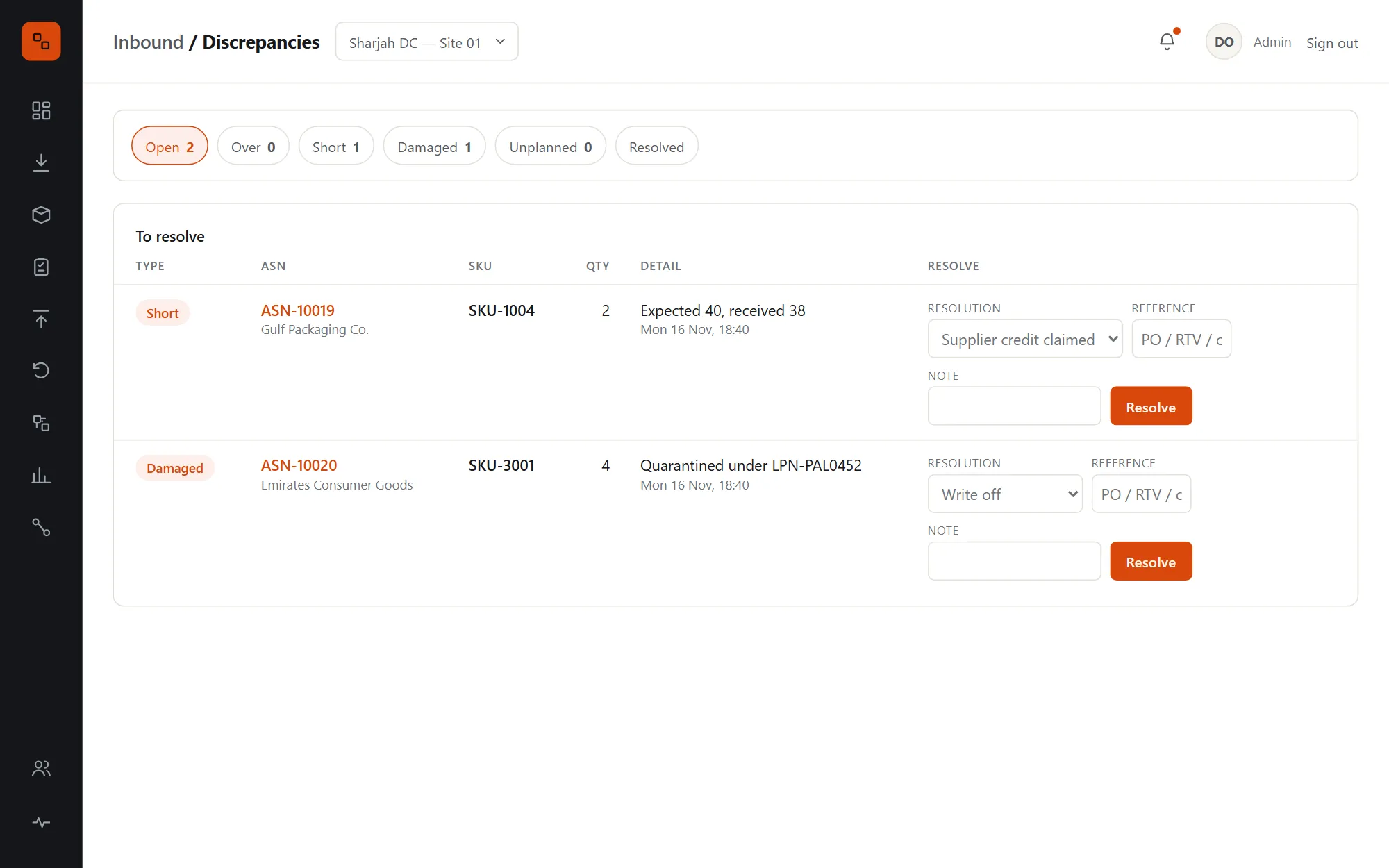
  • Damaged: write off or return to vendor, taking the exact quarantined units
  • Short: supplier credit claimed, or accepted with a reason
  • Over and unplanned: matched to a PO, accepted, or returned from the slot you name
  • PO, RTV or claim numbers required where they apply, with who resolved it and when
Open discrepancies filtered by type: a short and a damaged line, each with its ASN, SKU, quantity and a resolution form

Allocation & wave planning

Waves built around the truck, not the order number.

Stock is reserved earliest expiry first, from the slot nearest the dock. Waves take orders by priority and carrier cutoff, and the preview gives a reason for every order left out.
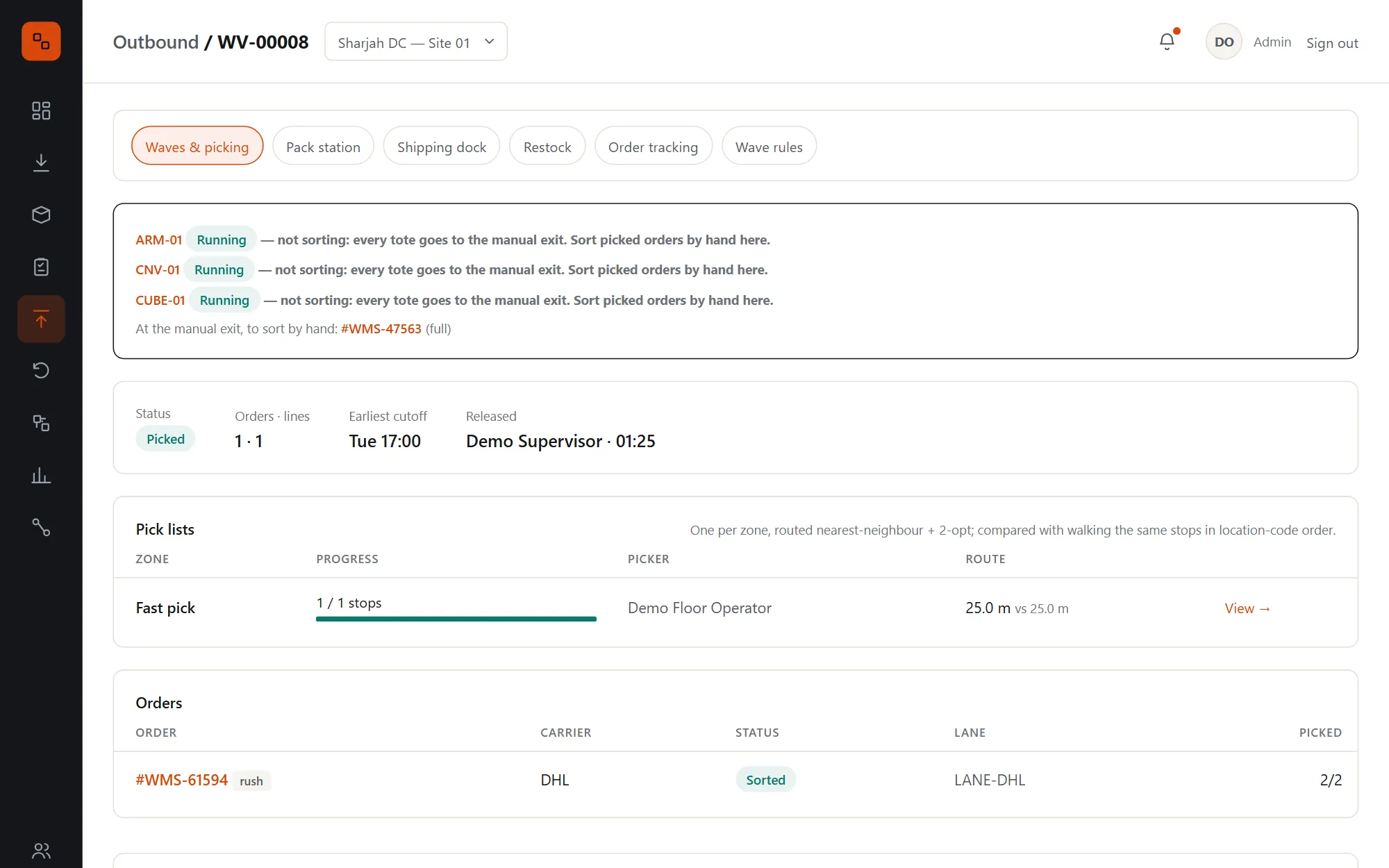
  • Only orders whose stock is fully reserved; rush orders jump the cutoff window
  • Limits on orders and lines per wave, from the site's signed-off wave rules
  • Releasing creates one pick list per zone, each routed by the optimizer
  • Cancel a wave before its first pick and its orders keep their reserved stock
  • Backorders stay short until cross-docking fills them
The Outbound page: device alerts, orders ready to wave, picking, at sortation and exceptions, the next wave preview and released waves
A released wave: its rule-set version, its pick list per zone with progress, and its orders with carrier, status and lane

Pick routing

Up to 31% less walking on every pick list.

Each list is sequenced through the aisles by the optimizer, aware that changing aisle means going round by a cross-aisle. Against legacy routing in location-code order, 30-stop lists in the fast-pick zone walk 30.7% less, and no route is ever longer.
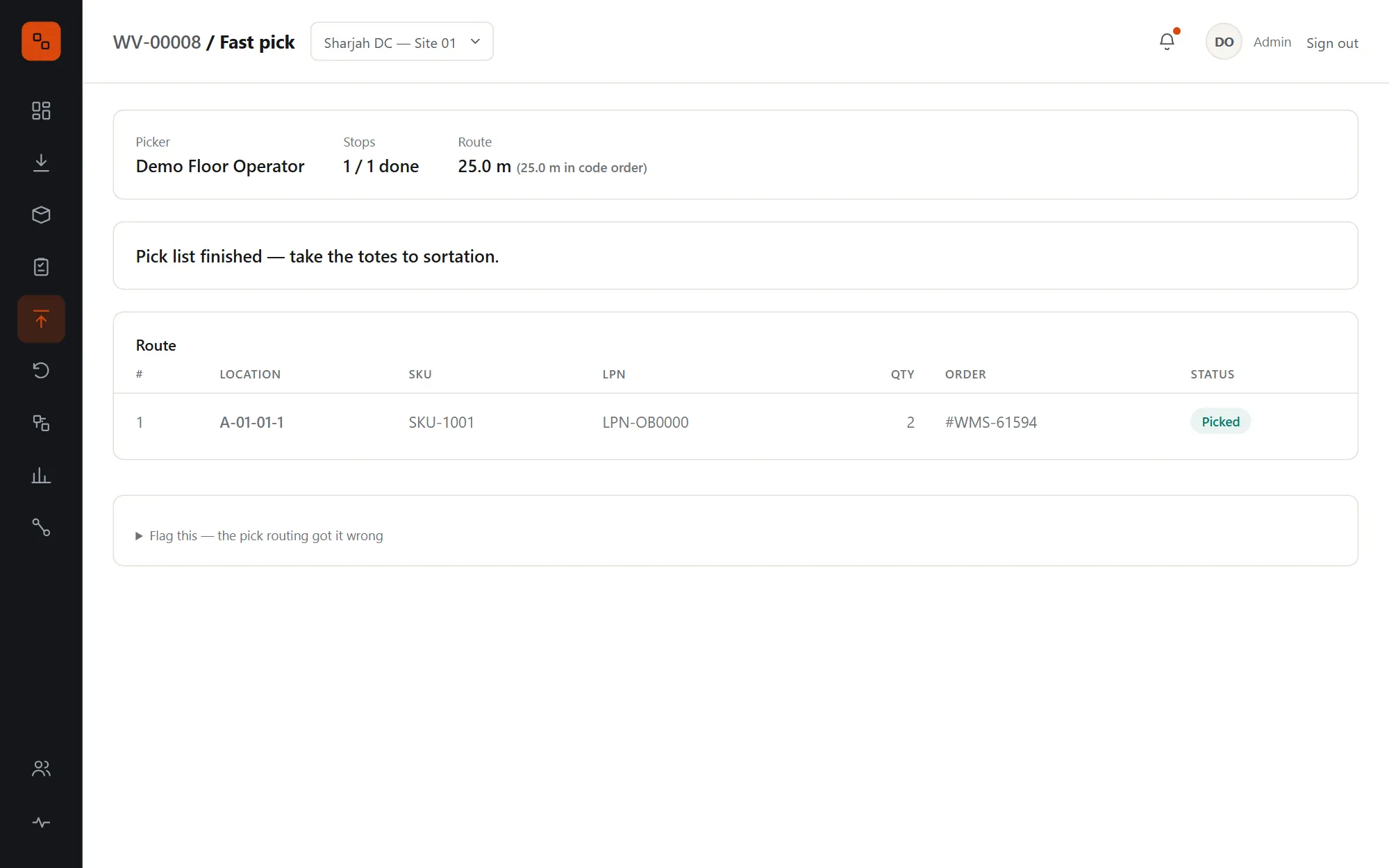
  • On a handheld the slot barcode must be scanned, and a wrong slot is refused
  • A short pick sends the slot for a count and re-allocates the missing units from other slots, re-planning the rest of the route
  • Only when storage can't cover it is the order held for a supervisor to ship short
  • Route strategies, walking speed per aisle and handling time per slot are all tunable, and testable with A/B experiments
  • Benchmark any layout with one command: 50 random lists per zone at 5, 10, 20 and 30 stops
A pick list in the fast-pick zone: the picker, one stop done, the route in walking order with location, SKU, licence plate and quantity

Sort, pack & ship

From tote to truck without a spreadsheet.

Picked orders go to their carrier's lane while it has room, otherwise to overflow, with all of an order's totes together. At the pack station the optimizer chooses the cartons, and the label and customs invoice are bought as soon as it's packed.
  • Cartonization tries several plans by volume and weight, filled to at most 85%, and the cheapest wins
  • If the optimizer is down, the station packs one carton by hand
  • "Carrier collected" ships every packed order on a lane and closes waves once all their orders have shipped
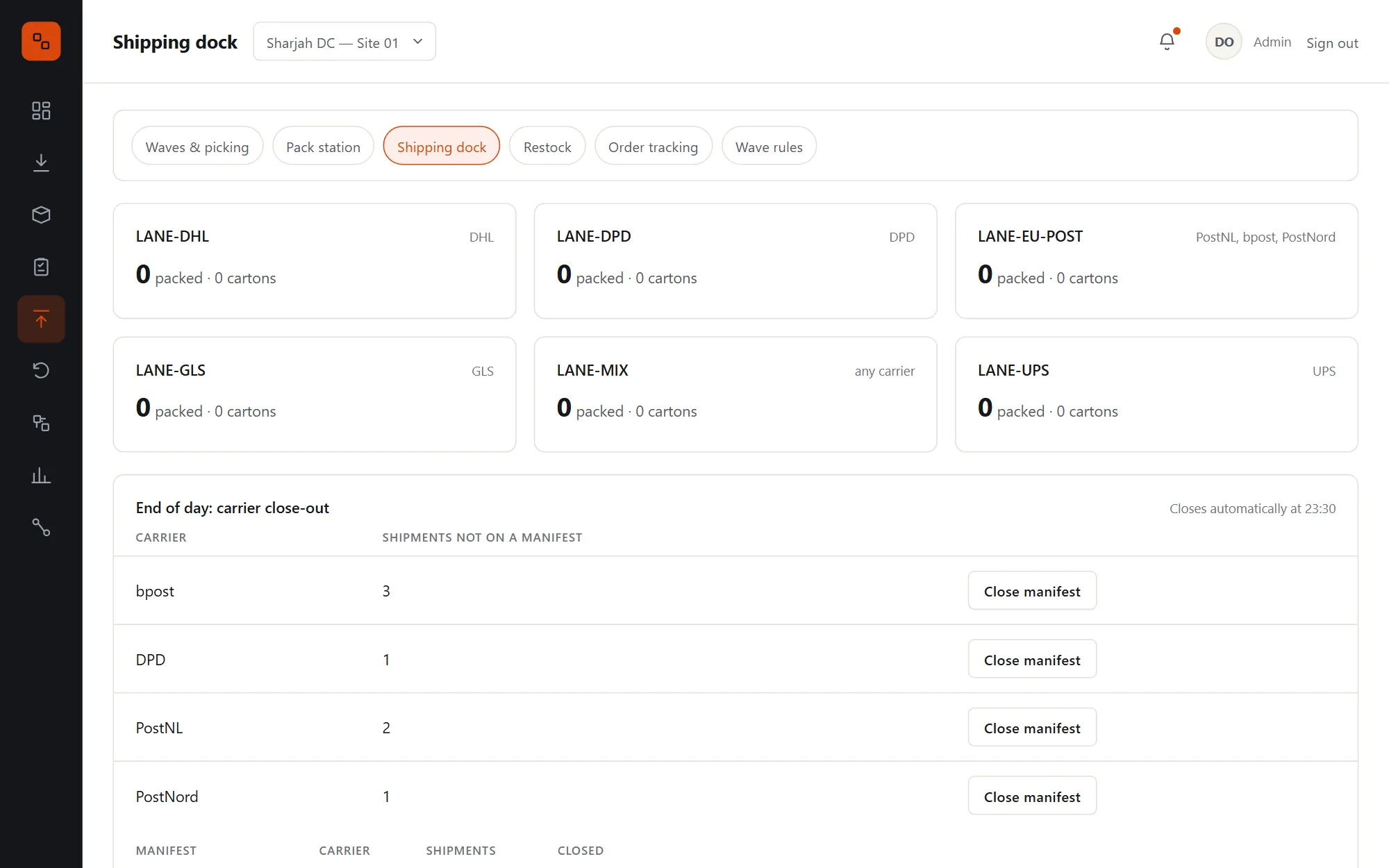
  • End-of-day carrier close-out puts every dispatched parcel on one manifest per carrier, automatically at 23:30 if nobody does
  • Orders without a label are held on the lane and listed, never shipped blind
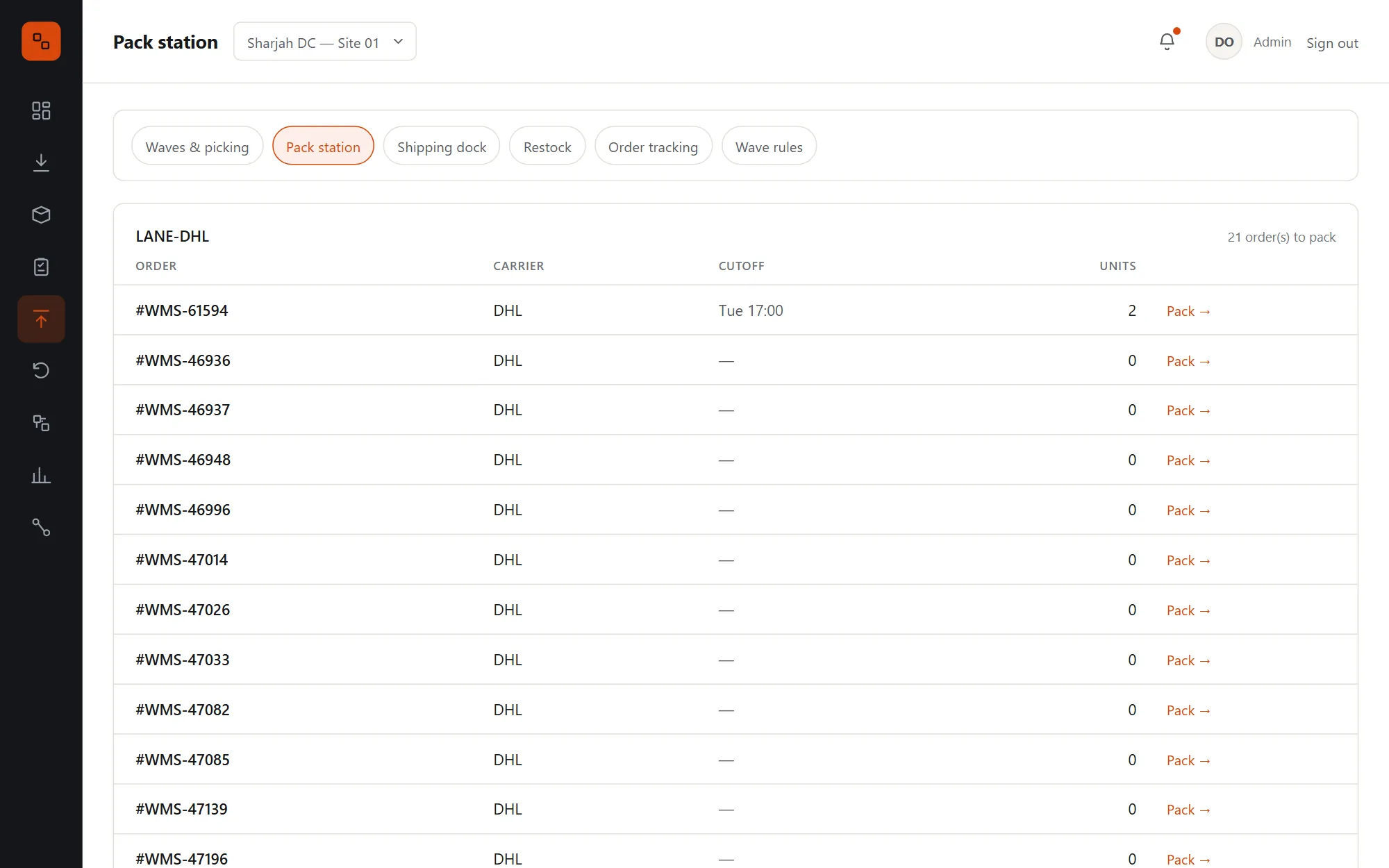
The pack station: orders at each lane with their carrier, cutoff and number of totes, ready to pack
The shipping dock: each carrier lane with packed orders and cartons, a Carrier collected button, and the end-of-day carrier close-out with manifests

Order tracking & changes

Where every order is, and everything that happened to it.

Every status change writes the order's timeline and an event, so the order search, the partner's webhooks and the analytics all see the same thing. Supervisors can unpack, cancel or ship short with a reason, and the stock is put back exactly.
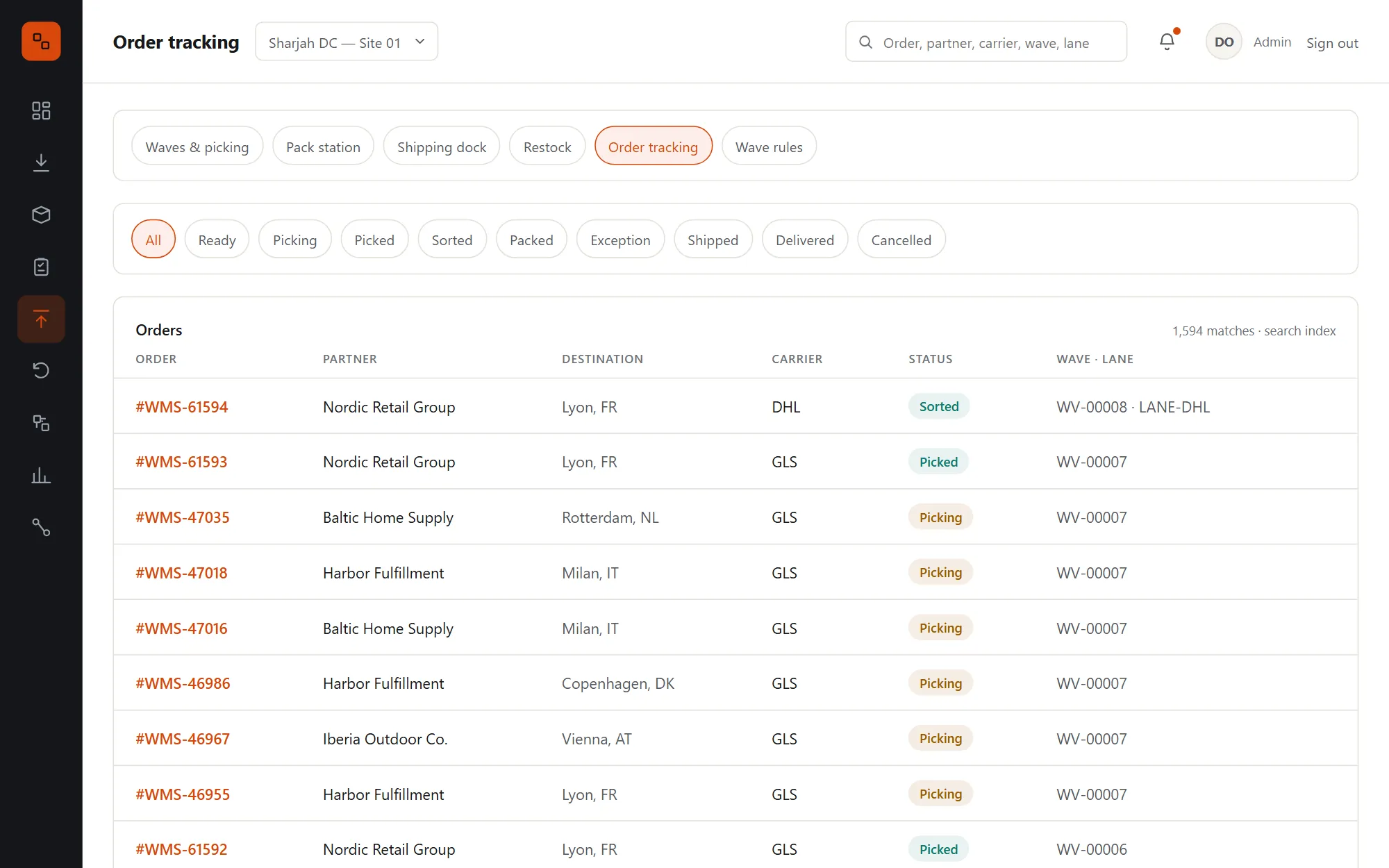
  • Search orders by number, partner, carrier or status, with a database fallback
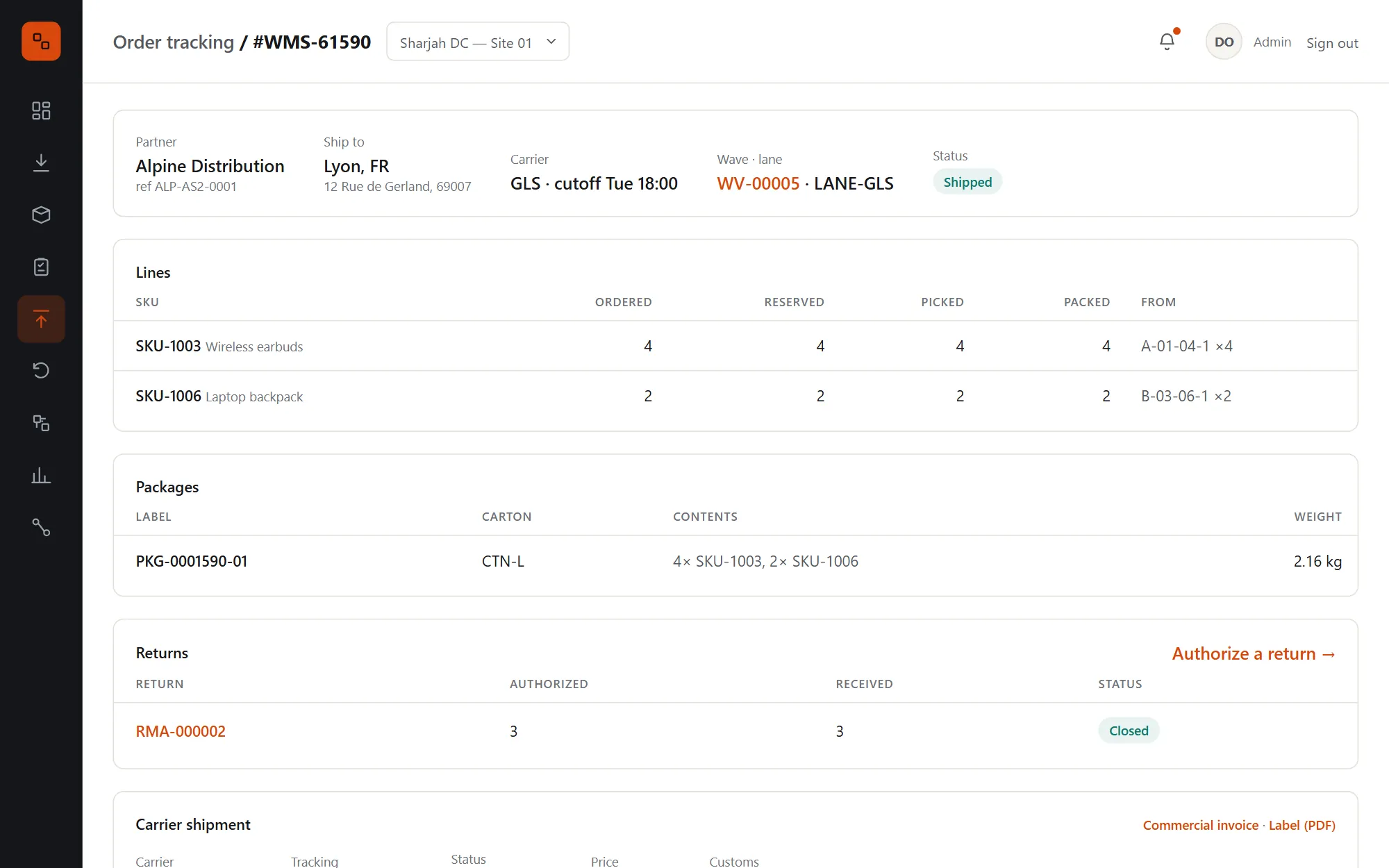
  • Lines, packages, labels, the commercial invoice, carrier tracking and returns on one page
  • Unpacking reverses packing exactly, and voids the cartons and the carrier label
  • Cancelling releases reservations; picked units become restock tasks placed by the optimizer
  • Partner cancel requests hold the order at dispatch until a supervisor decides
An order page: partner, ship-to, carrier and lane, its lines, its package, its return and the carrier shipment with tracking
Order tracking: every order with partner, destination, carrier, status and lane, filtered by status

Wave rules with sign-off

Rule changes need a second pair of eyes.

Wave rules are versioned. A supervisor proposes a change with a reason, and only a designated logistics PM can sign it off, never their own draft. Every wave records the rule version it was planned with.
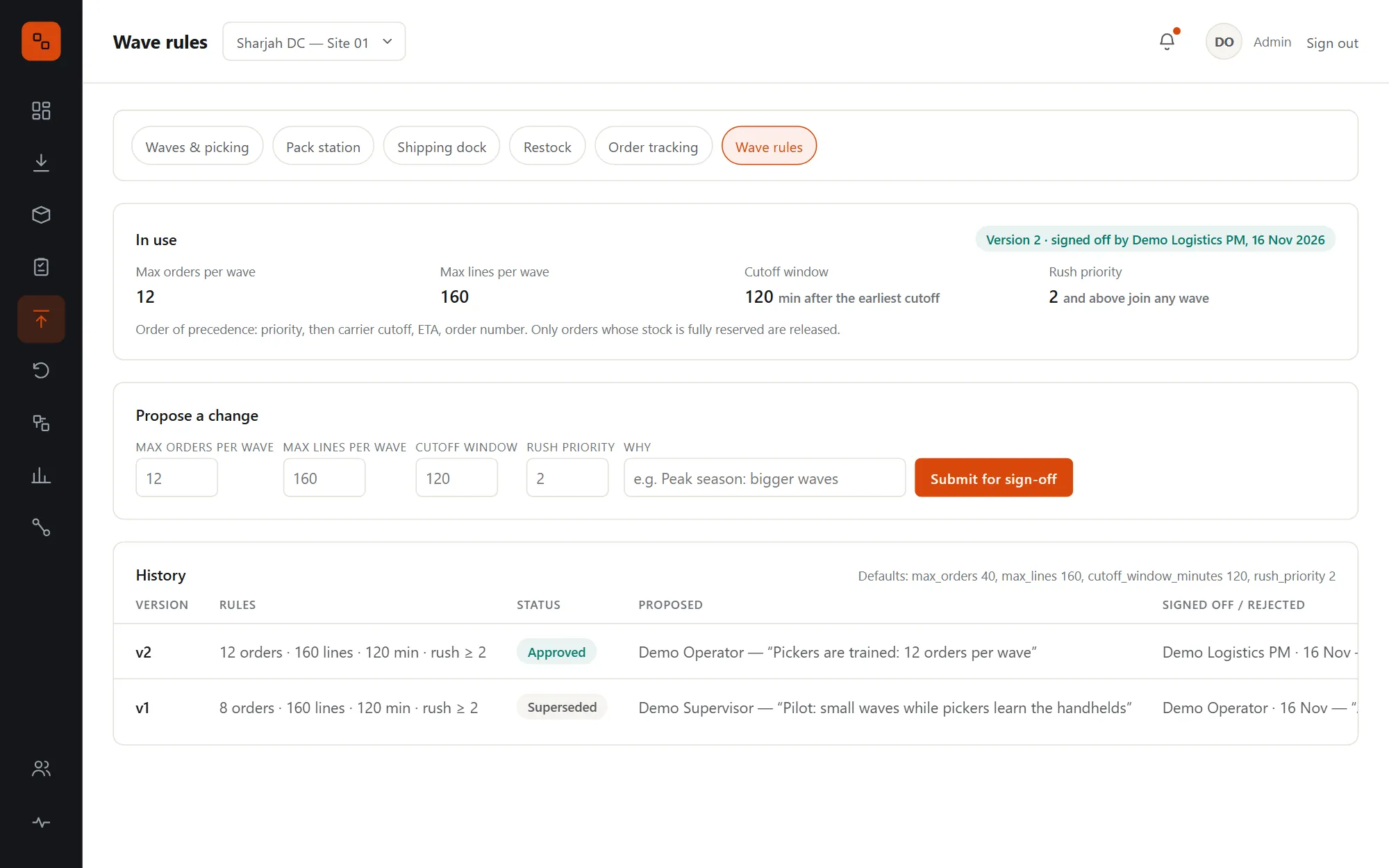
  • Cutoff window, rush priority, and order and line limits per wave
  • Signing off is a responsibility you assign per person, whatever their floor role
  • Drafts can be rejected or withdrawn; only one waits at a time
  • Until the first sign-off, planning uses safe defaults and says so
Wave rules: the version in use and who signed it off, a form to propose a change, and the history of approved and superseded versions

Returns & grading

Every returned unit graded, placed and accounted for.

Returns are authorized from the partner API or the screen, with a carrier return label from the customer back to you. At the returns area each unit is received against its RMA and graded, and the RMA number follows it into storage.
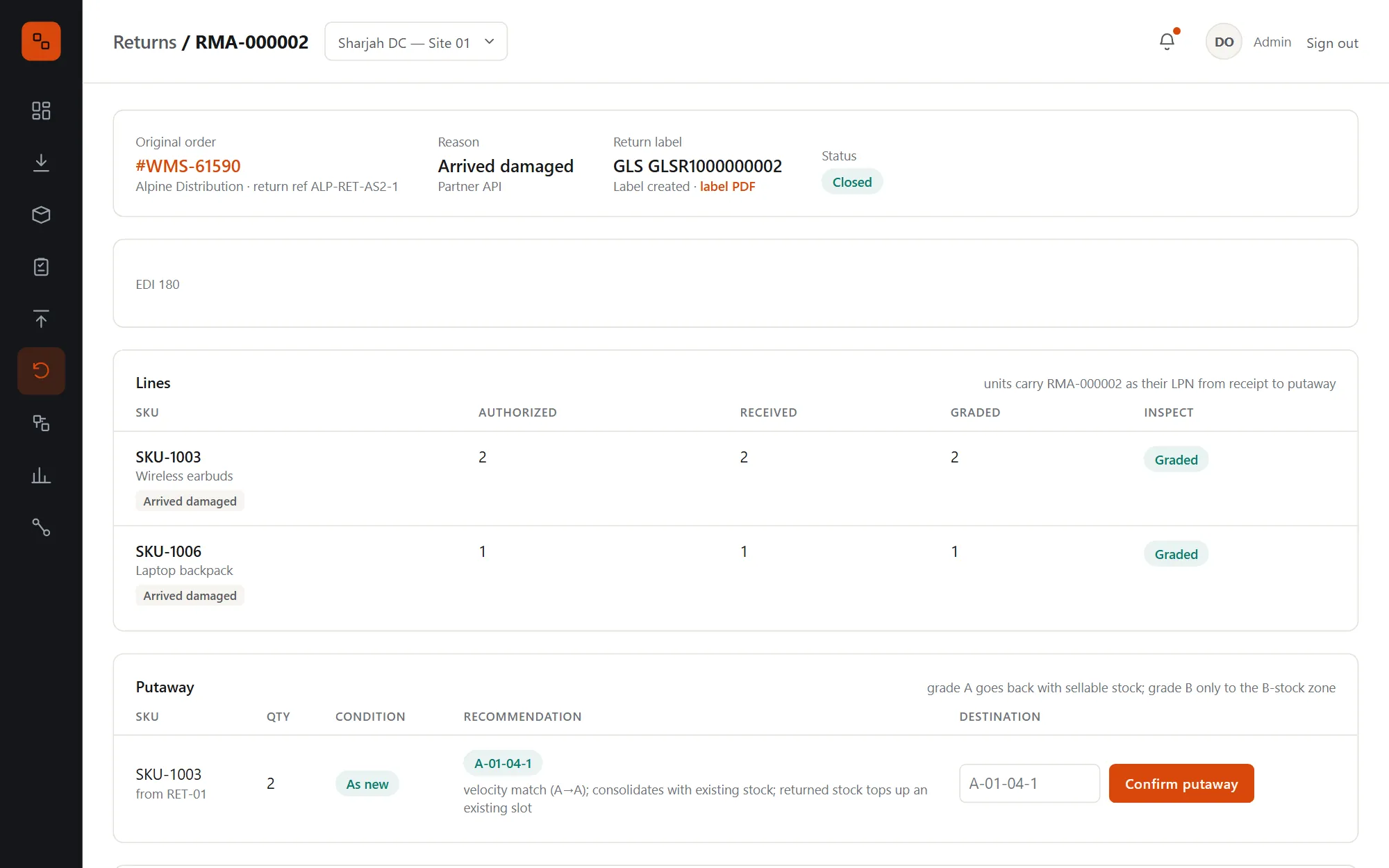
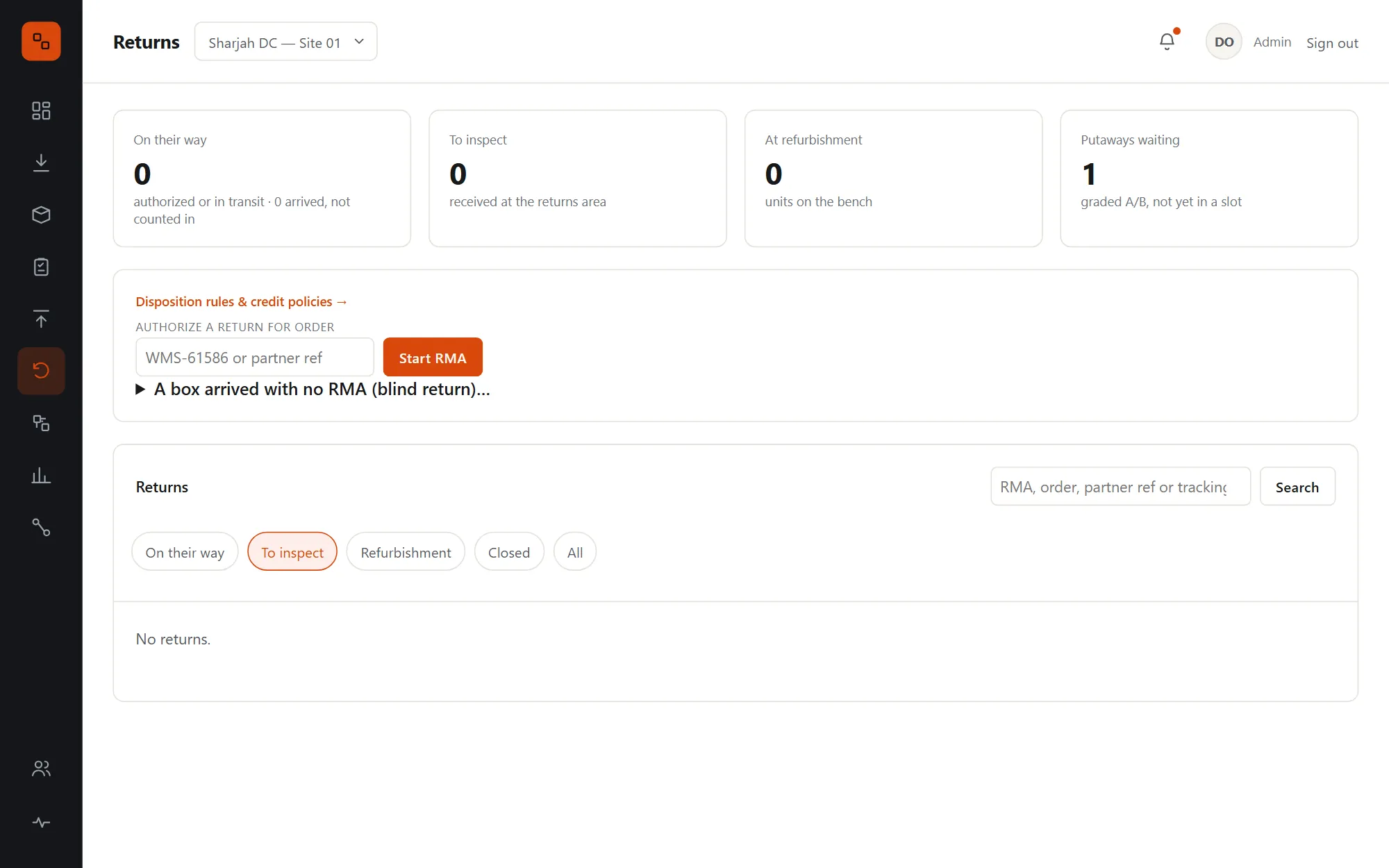
  • Five grades: A resell as new, B-stock, refurbish, scrap and return to vendor
  • Return labels with tracking: In transit when collected, Arrived when delivered
  • Blind returns with no RMA get one on the spot, linked to the order on the packing slip
  • B-stock is its own stock pool, sold only by orders that ask for it
  • A ledger trail for every unit, from the return receipt to its final location
A return: the original order, reason, return label and tracking, lines received and graded, putaway with the optimizer's recommendation and the credit for the partner
Returns: on their way, to inspect, at refurbishment and putaways waiting, with Authorize a return and the list of returns by status

Disposition rules & credit

Grades that follow your rules, and credit that follows the grade.

Rules by SKU, partner or customer reason suggest or enforce a grade. Each partner's credit policy then turns the final grades into what the return is worth, ready for them to refund against.
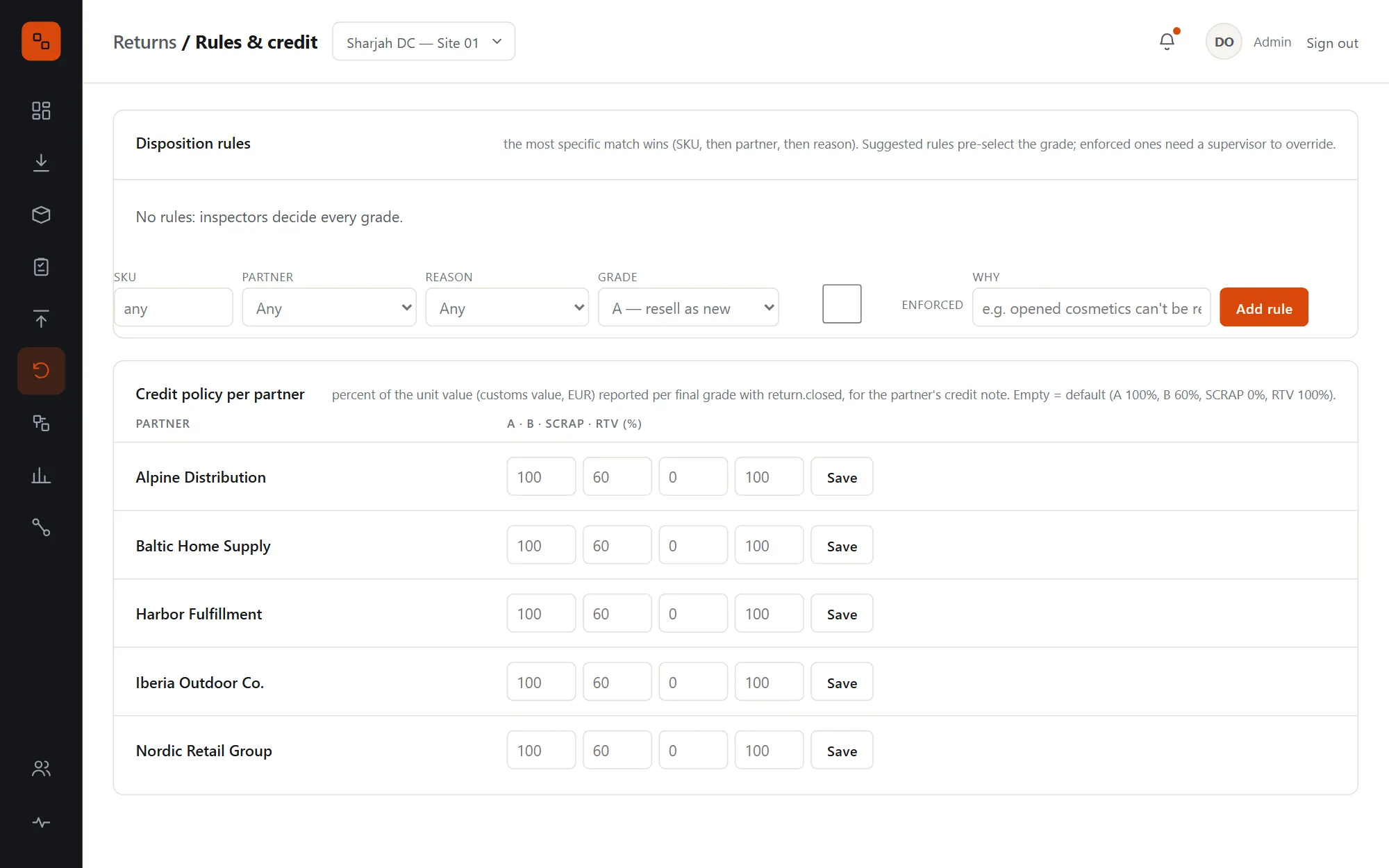
  • The most specific rule wins: SKU, then partner, then reason
  • Suggested rules pre-select the grade; enforced rules need a supervisor and a note to override
  • Credit per grade per partner, by default A 100%, B 60%, scrap 0%, return to vendor 100%
  • The credit reaches the partner in the webhook, the API and an EDI 180
Disposition rules and the credit policy per partner: the percentage of unit value credited for each grade

Conveyor sortation

Sorters that decide in half a millisecond.

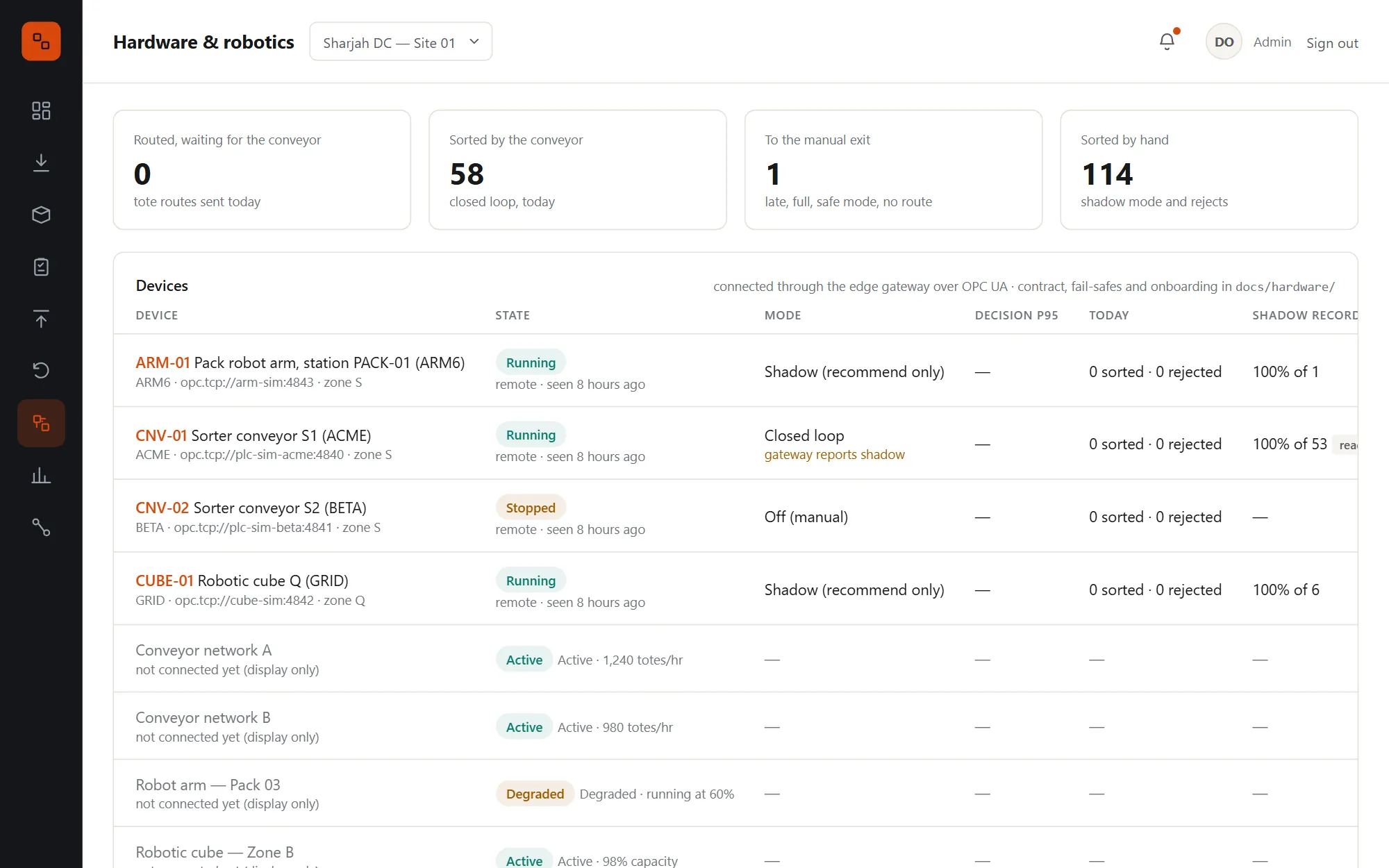
An edge gateway speaks OPC UA to each sorter's PLC. When an order is picked, the WMS sends the sorter a route for its totes; the gateway answers each scan from its routing table, without waiting on the WMS.
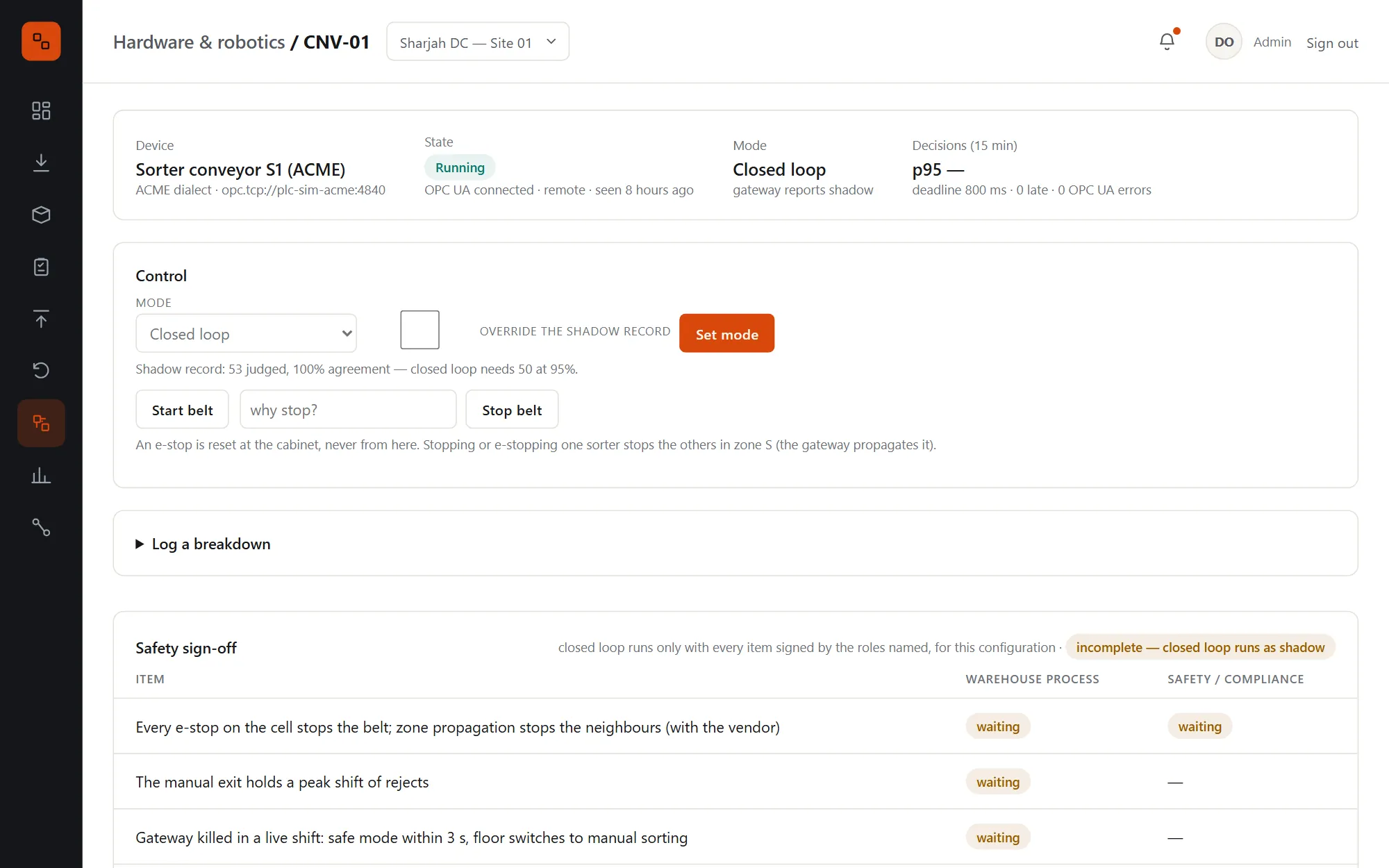
  • Shadow mode first: the gateway recommends, people sort, and the WMS compares the two
  • Closed loop only after 50 shadow totes at 95% agreement, and a complete safety sign-off
  • Totes the sorter can't route go to the manual exit and are listed at the sort station
  • In the pilot: decisions at p95 0.5 ms in the gateway, 18.9 ms from the PLC's side, against an 800 ms deadline
  • A driver per vendor dialect, each passing the same conformance suite before it goes near a floor
Hardware and robotics: totes routed and sorted today, the manual exit, open alerts and every device with its state, mode, decision time and shadow record
A sorter's page: running in closed loop, the shadow record of 53 judged at 100% agreement, belt controls and the safety sign-off checklist

Robotic cube & robot arm

Goods to person, and a robot at the pack station.

Cube bins are ordinary locations, so picks and putaways there are ordinary tasks done at a port. The robot arm packs the cartons the WMS planned, and hands anything it can't do back to the packer with instructions.
  • While the cube is down, new work skips its bins and open picks are re-allocated from conventional storage
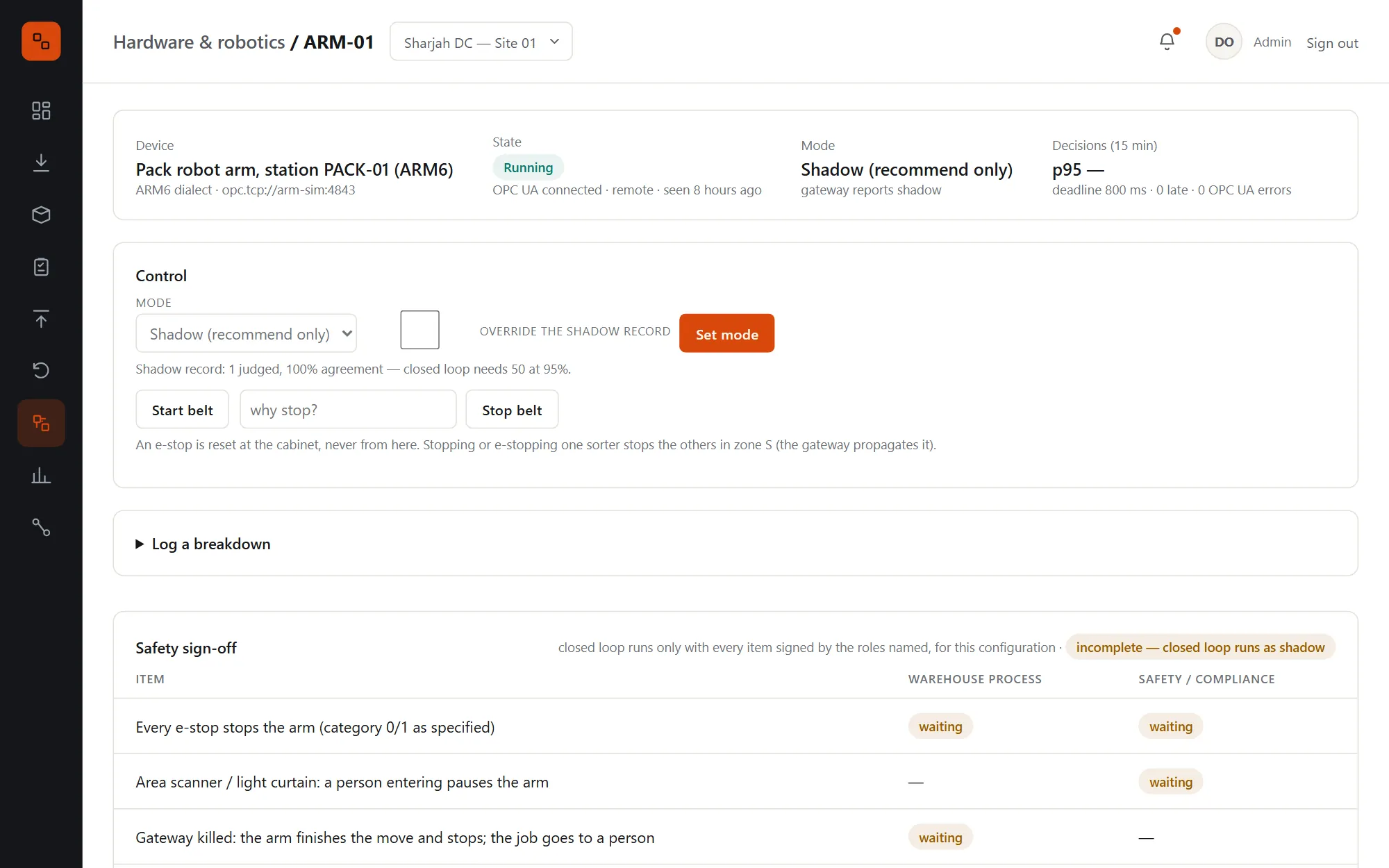
  • The arm dry-runs each order in shadow while people pack, predicting how long it would take
  • A failed grip or an item too heavy goes back to the packer; a person in the cell pauses the arm
  • An e-stop on the arm stops the sorters in its zone
The pack robot arm's page: running in shadow, its dry-run record, controls, and the safety sign-off checklist for the arm

Predictive maintenance

The breakdown, flagged the day before.

Motor temperatures, reject rates, battery health, grip failures and cycle times are checked three ways: past the limit, trending towards it within 24 hours, or far from the device's own normal. A learned model joins in once there is history to learn from.
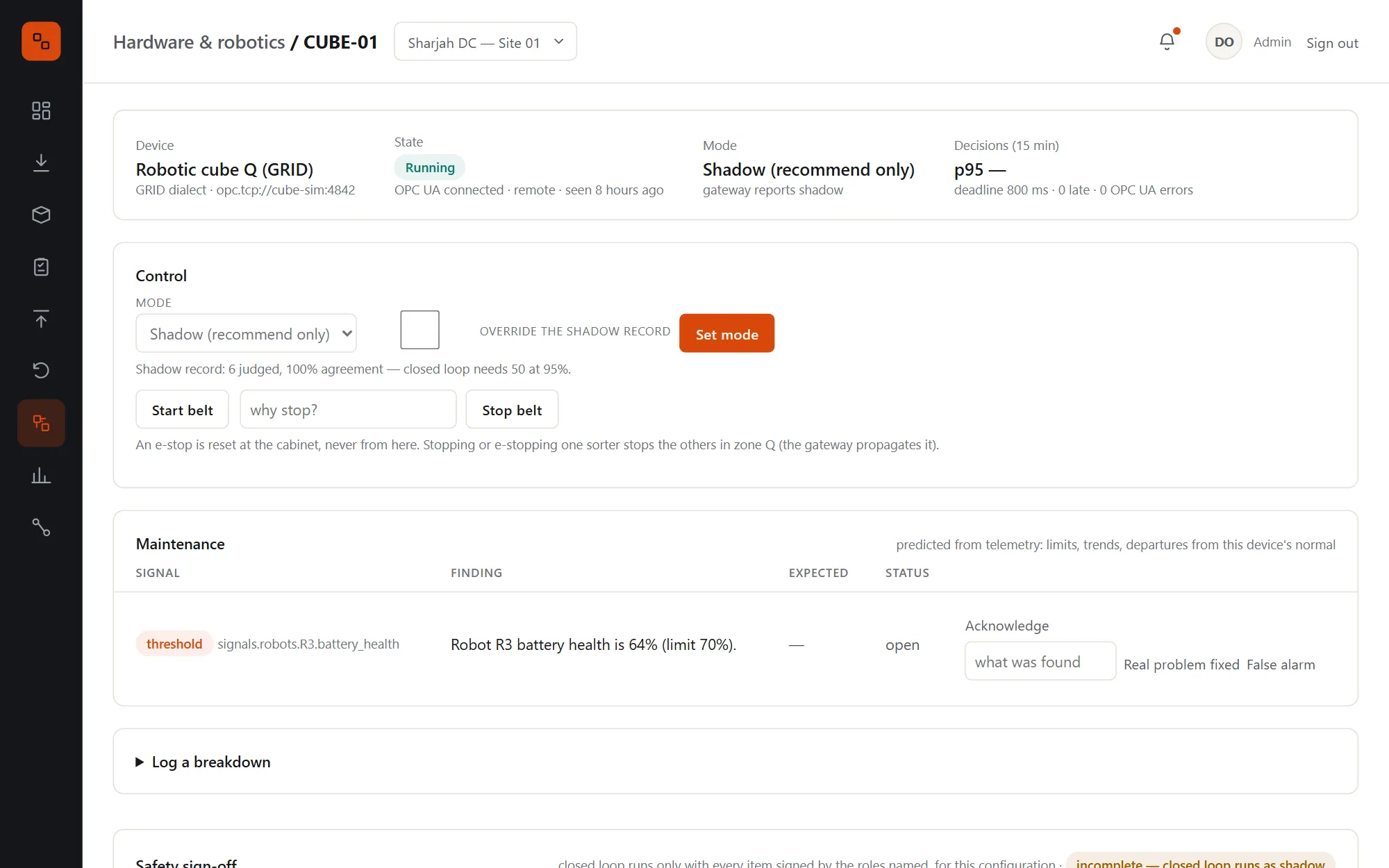
  • Rules first: threshold, a 2-hour trend with the predicted time, and 3σ anomalies against a 7-day baseline
  • Technicians close alerts as real problem fixed or false alarm, and log breakdowns: those are the labels
  • A model per device class, trained weekly, used only if it beats chance on the most recent quarter of data
  • Alerts open and resolve themselves, and are acknowledged on the device page
The robotic cube's page: a maintenance alert for robot R3's battery health at 64% against a 70% limit, with acknowledge and resolve buttons

Partner API, webhooks & EDI

Plug in partners, old and new.

Modern partners send orders as JSON and get signed webhooks for every change. Legacy partners exchange EDI X12 over AS2. Both go through the same order intake, and every call is logged.
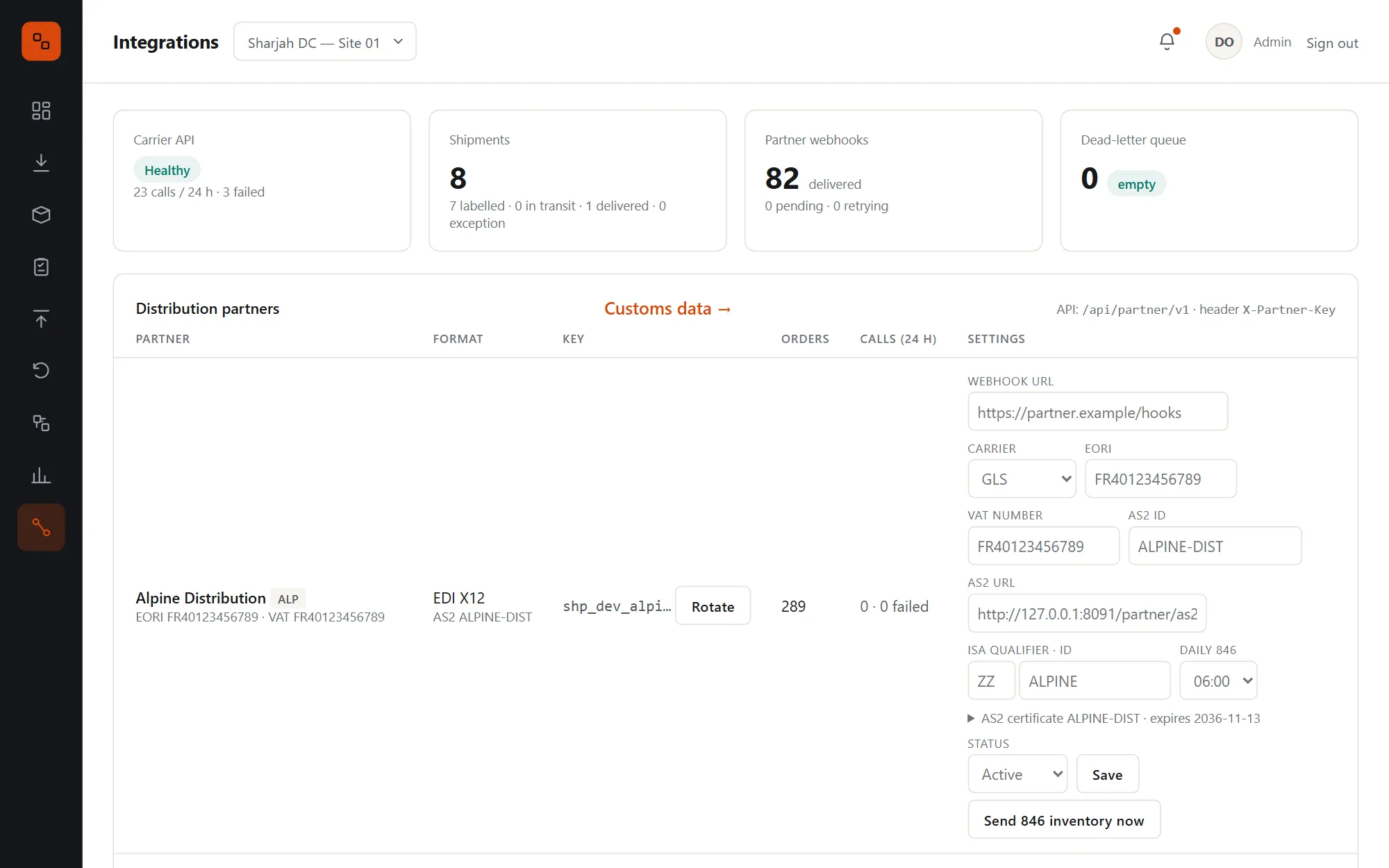
  • Idempotent order intake, status, available to promise, changes and cancellation
  • Webhooks signed with HMAC, retried from 10 seconds to 30 minutes, then held for replay
  • EDI 940 in; 997, 945, 846 and 180 out, over AS2 with signed MDNs, or pulled over the API
  • Retries, circuit breakers and a call log for every integration, with circuit state on screen
  • Partner keys stored as hashes, rotated on screen and shown once
Integrations: circuit state, deliveries, dead letters and EDI waiting, then each partner with its format, key, webhook URL, AS2 settings and daily 846

Carriers & customs

Labels and customs paperwork that are right first time.

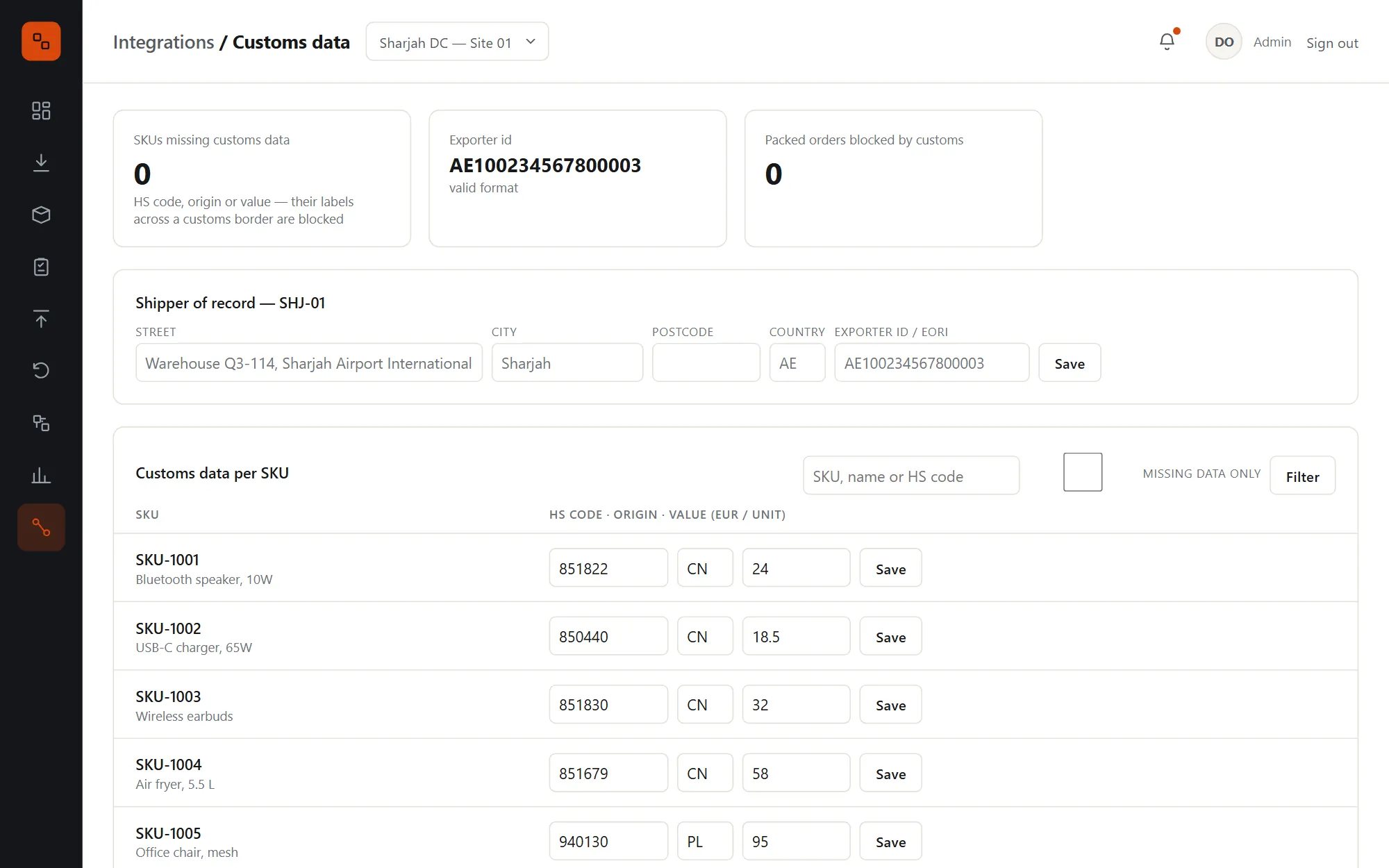
Shipmate rate-shops the carriers that collect at your site and buys the label at packing, with a commercial invoice for anything that crosses a customs border. Missing customs data blocks the label with the exact list of what to fix.
  • Rate shopping for the order's service level, with a fallback carrier if the carrier API is down
  • Commercial invoices with EORI, VAT number, HS codes, origin and an import VAT estimate
  • A customs data screen with the gaps first, and the orders they block
  • Tracking by signed webhook, with polling for quiet shipments; delivered orders become Delivered
  • Label voids on unpacking, retried until the carrier accepts
Customs data: the exporter of record, and per SKU the HS code, country of origin and customs value, with gaps listed first

Operations analytics

The floor's numbers, defined once.

Throughput, pick rate, SLA, dock to stock, putaway overrides, route improvement, optimizer fallbacks and hardware uptime, for the last hour, day, week or month, each against the period before.
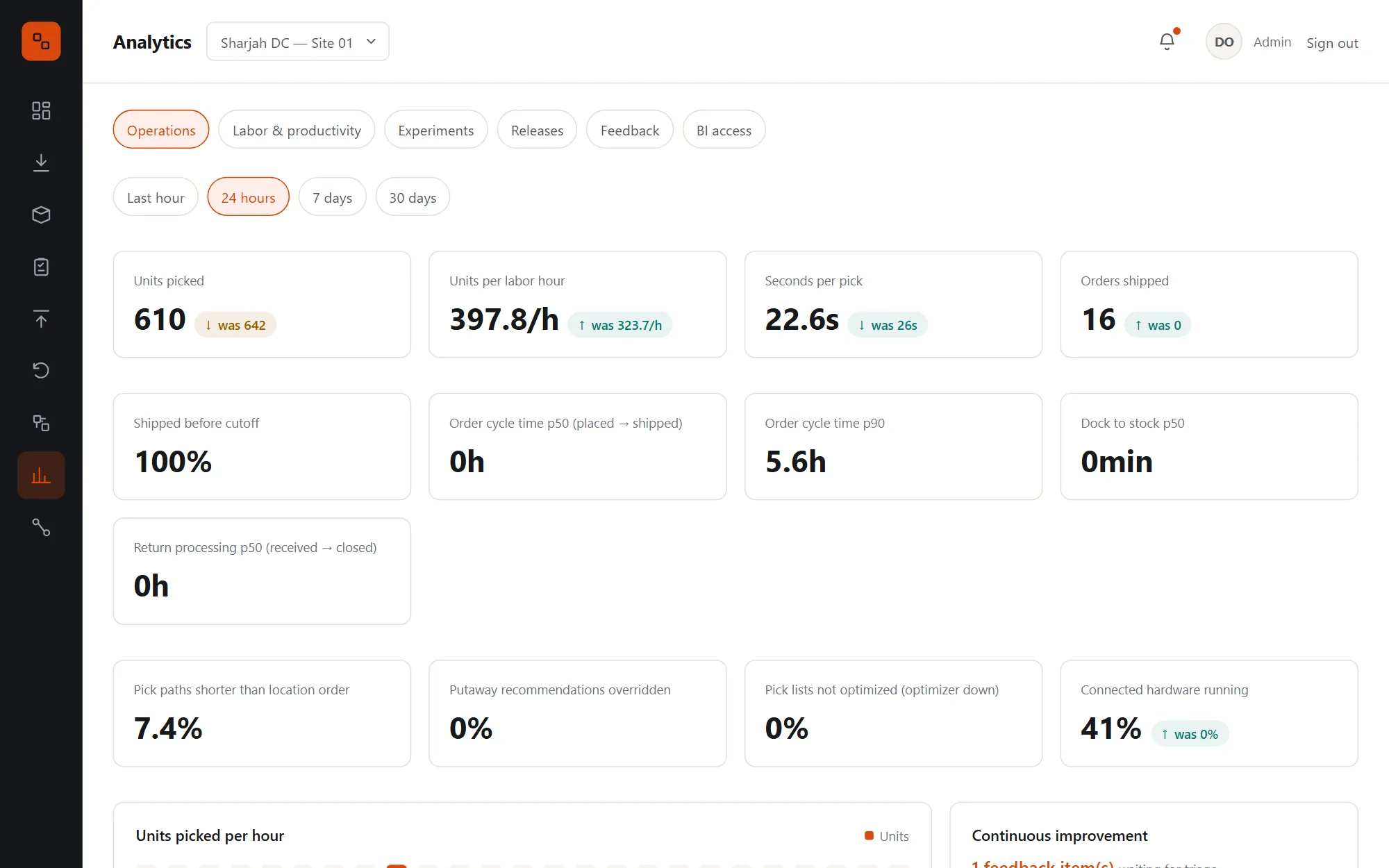
  • One set of definitions feeds the page, the monitoring dashboards, the weekly digest and BI
  • Units picked per hour, from real pick history
  • KPI gauges sent every minute to your monitoring
  • Shortcuts to open feedback, running experiments and recent releases
Analytics: units picked, units per labour hour, seconds per pick, orders shipped, SLA, dock to stock and putaway overrides, with units picked per hour

Labour & productivity

Who did what, where and when, fairly measured.

Lines, units, active hours, rate, travel time per task and accuracy, by worker, by zone and by shift, with putaways, overrides and orders packed alongside. Export it all to CSV.
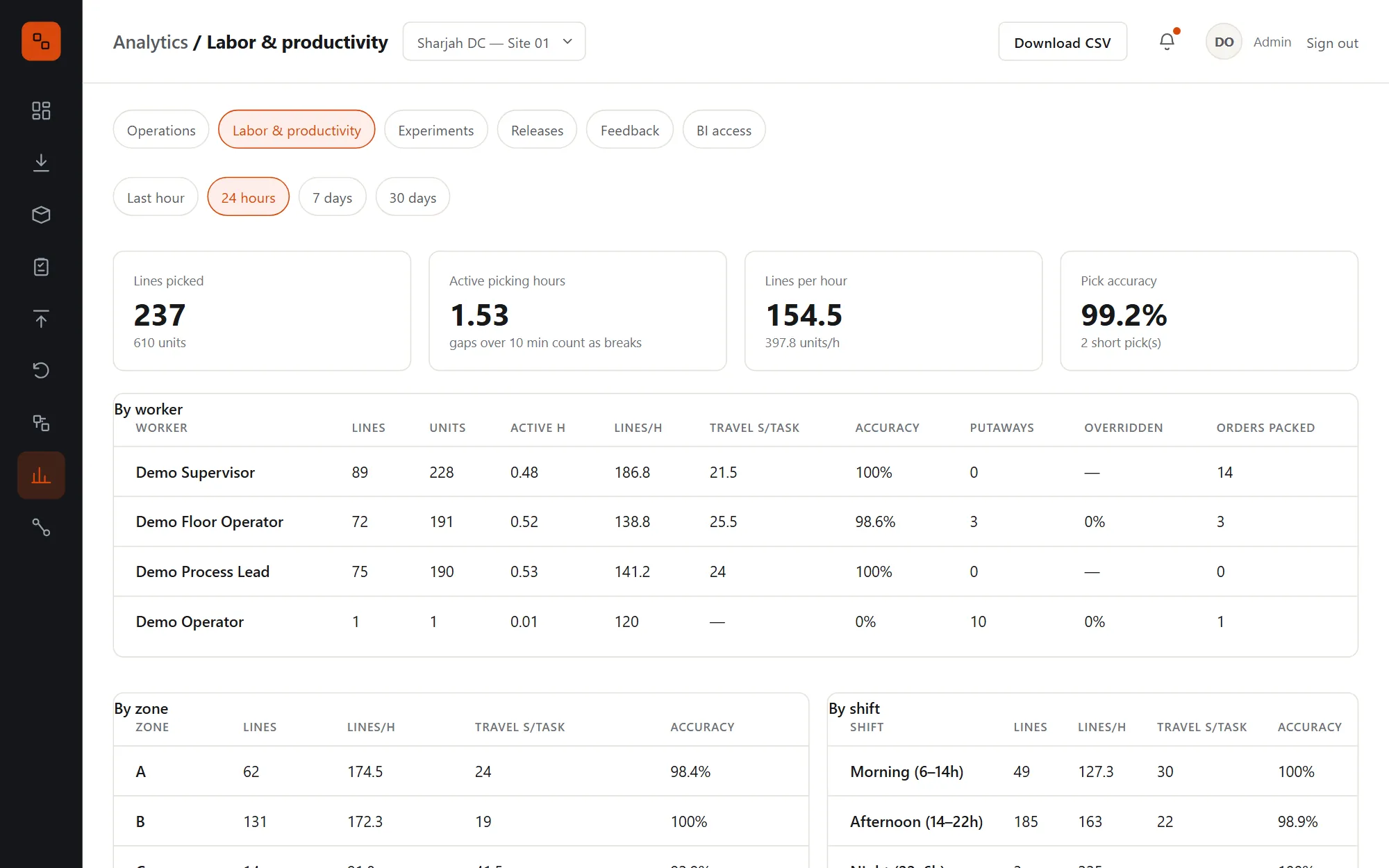
  • Active time from real task timestamps, not shift length
  • Travel time per task, so a slow zone isn't blamed on a slow picker
  • Last hour, day, week or month
Labour and productivity: lines, units per hour and accuracy by worker, by zone and by shift

Algorithm A/B tests

Prove a change on the floor before you keep it.

Putaway weights, pick route strategy, walking speed, handling time and the sort overflow threshold are all parameters. Run a variant against the current setting on real work, and Shipmate says when the difference is real.
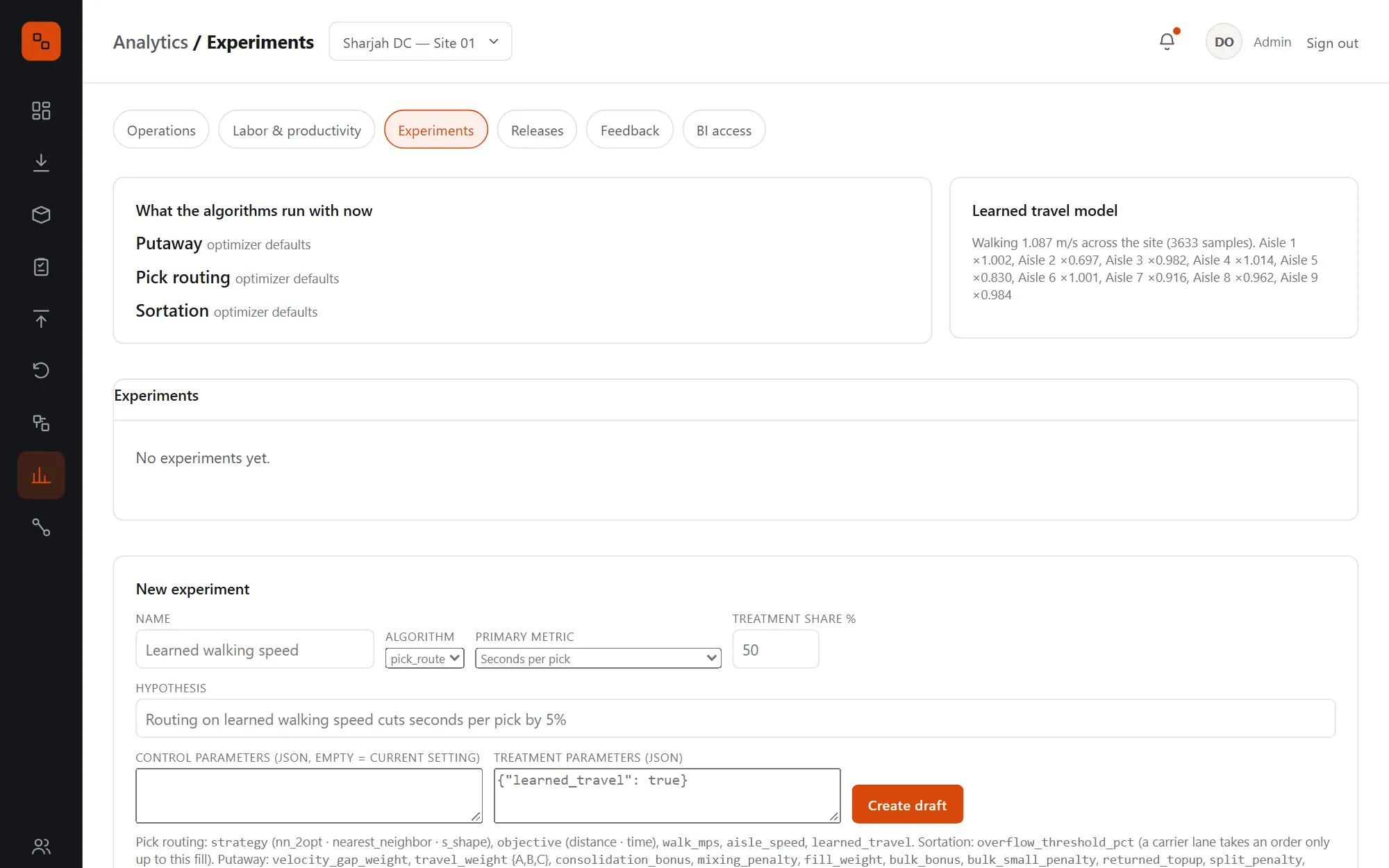
  • Pick lists, putaways or orders assigned by a stable hash, measured when their work is done
  • Welch's t-test, with how many more units it needs while it isn't significant yet
  • Backtest an idea on past pick lists first, timed on the learned clock
  • Learned travel: walking speed per aisle and handling time per slot fitted from pick history each night
  • Concluding an experiment can make the winner the site's setting
Experiments: the algorithm settings in use, the learned travel model, and the form to start a new experiment

Release impact & feedback

Know within the hour if a release hurt the floor.

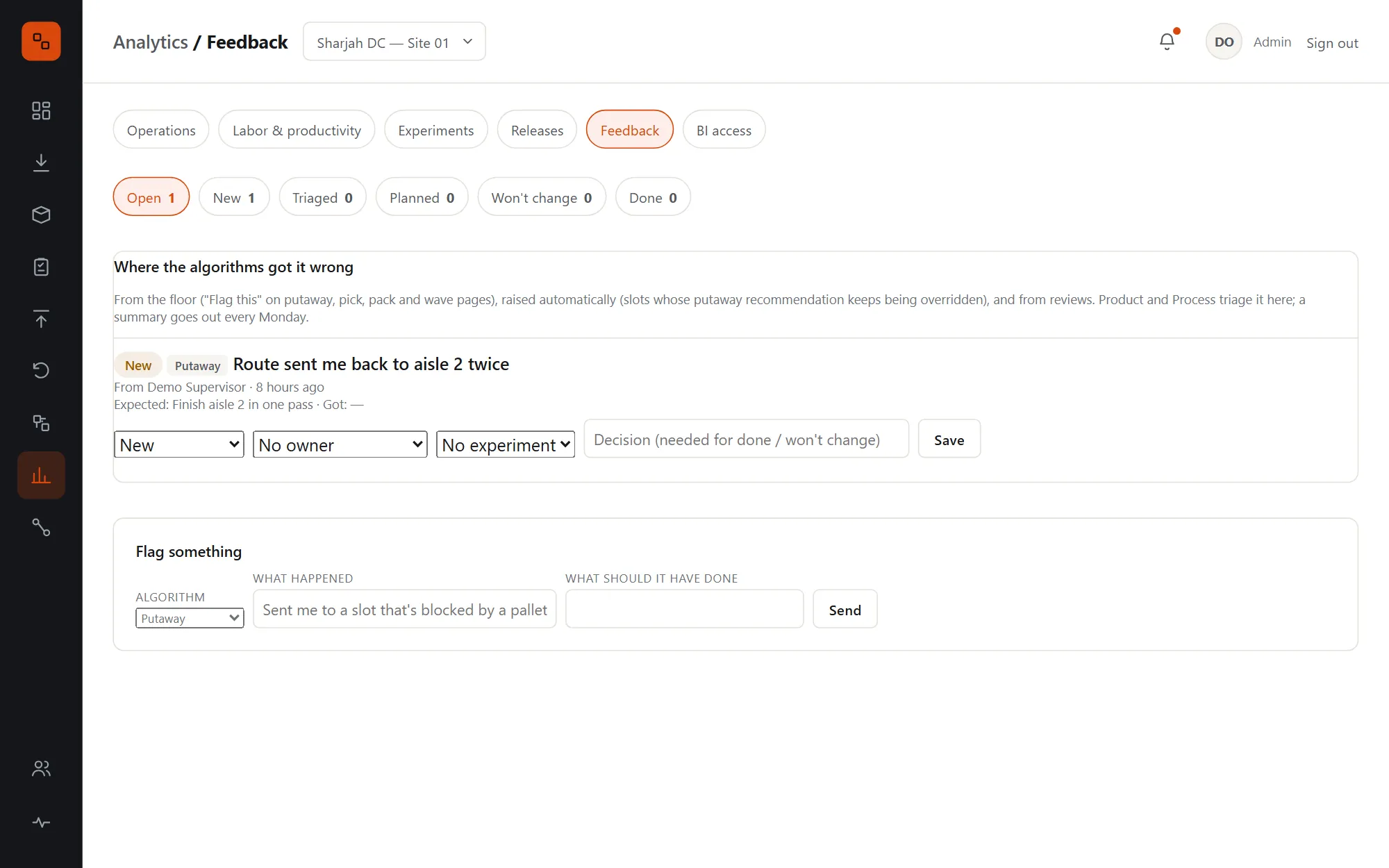
Each deploy is marked. The hour after it is compared with the hour before and the same hour a week earlier; a KPI worse than both is a regression and engineering gets an email. On the floor, "Flag this" sits on the screens where algorithms make decisions.
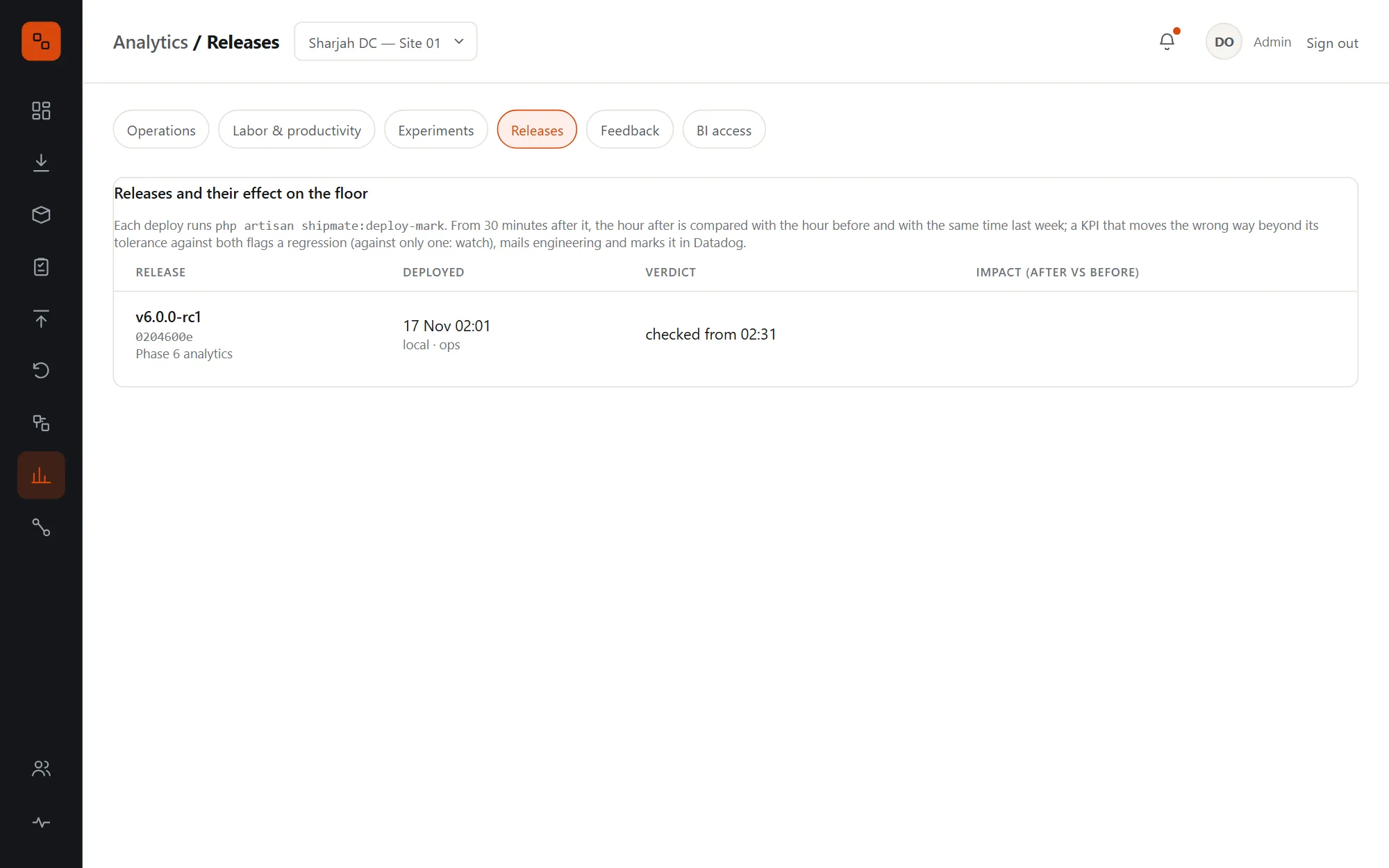
  • Regressions alarm; worse against only one comparison is marked "watch"
  • Feedback from receiving, picking, packing and waves, triaged by supervisors and PMs
  • Slots whose putaway is overridden three times a week are raised automatically
  • A Monday digest of open feedback and hotspots
Releases: each deployment with its version, time and impact on the floor's KPIs
Algorithm feedback: open items from the floor with where they came from, triage status and owner, and a form to flag something

BI access

Your data in your BI tool, without customer details.

Admins issue read-only keys per dataset. Picks, putaways, orders, shipments, returns, grades, movements and experiments are served as JSON or CSV, incrementally, or from read-only SQL views.
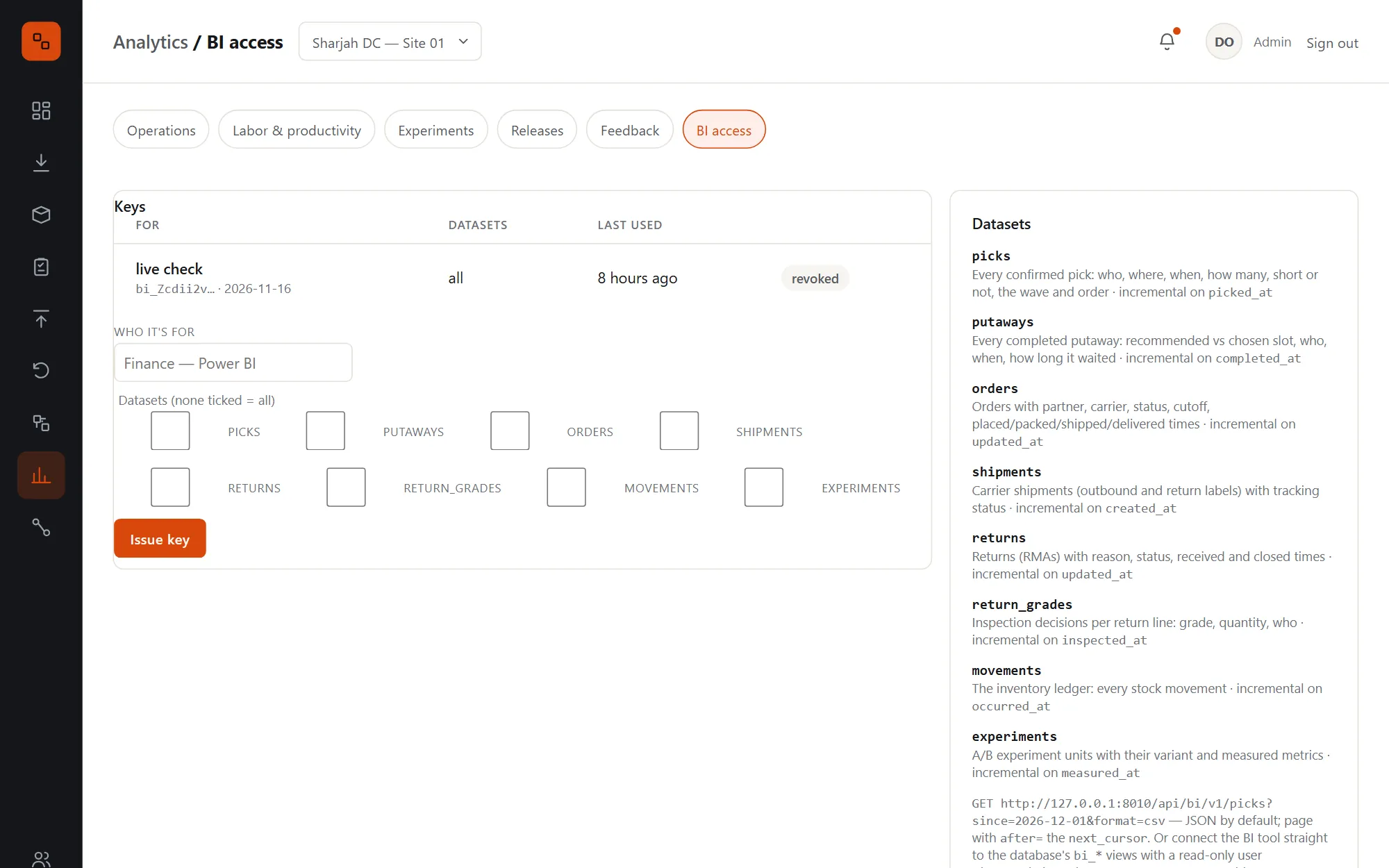
  • Incremental with a since date and cursor paging, up to 10,000 rows a page
  • Views carry no customer names or addresses
  • Keys scoped to datasets and revocable at any time
BI access: issuing a key with chosen datasets, existing keys with their last use, and the list of datasets

Roles, users & handhelds

The right buttons for the right people.

Viewer, operator, supervisor and admin, each including the one below, plus responsibilities like signing off wave rules or safety checklists given to named people. A JSON scanner API gives rugged handhelds the same services and permissions.
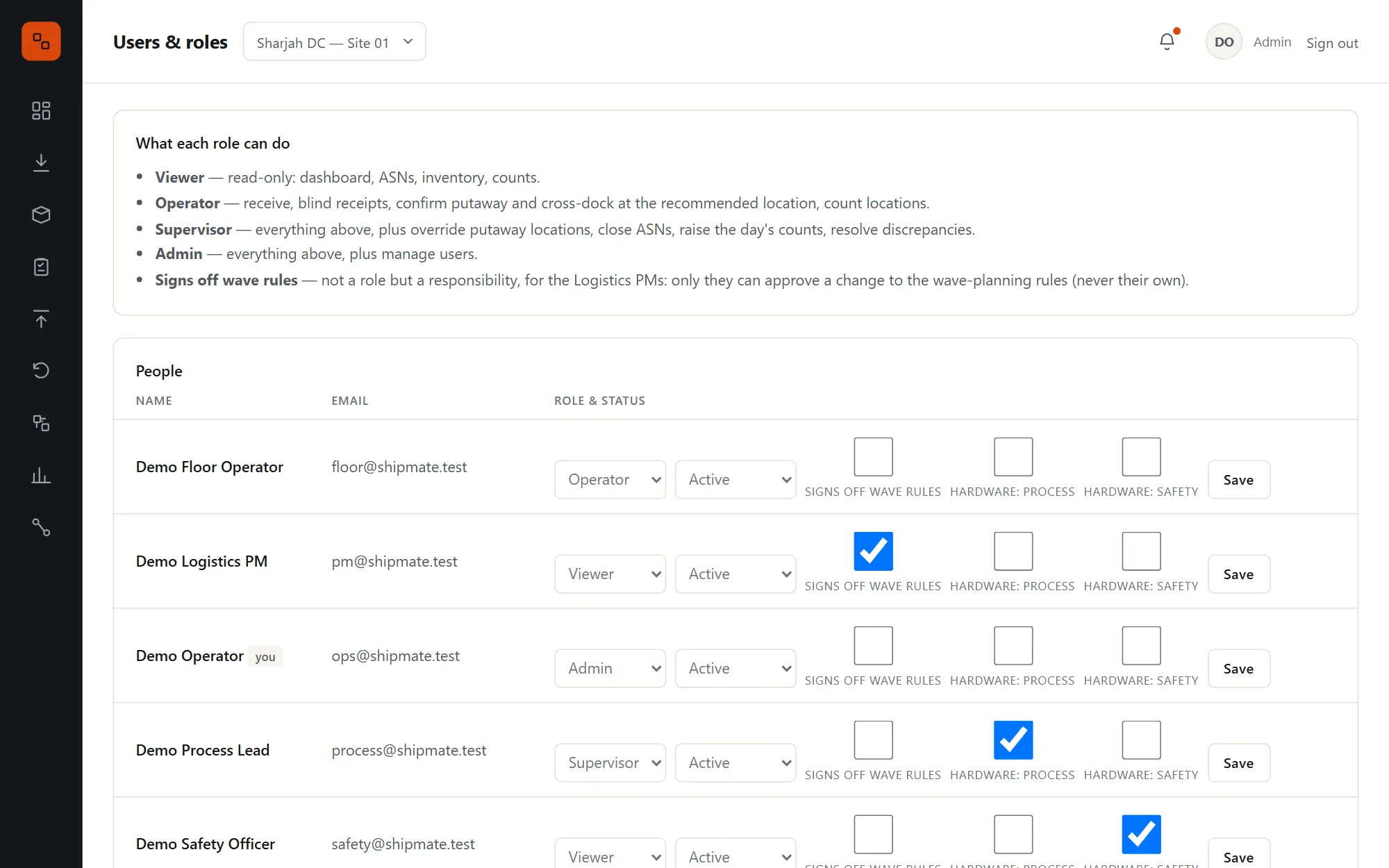
  • Pages hide what a role can't do, and every route checks it
  • Deactivating a user ends their session and revokes their scanner tokens at once
  • Nobody can change their own role, and the last admin can't be removed
  • Scanner tokens last one shift; the API covers receiving, putaway, counts, picking, packing and returns
Users and roles: what each role can do, then each person with their role, status and the sign-off responsibilities they hold

Honest about where it stands

Built and piloted. Waiting for its first real robots.

Hardware is where software meets people's safety, so we tell you exactly what has and hasn't been proven. The robotics integration has been piloted on simulators, not yet on physical equipment.

  • Built and piloted end to end: Every flow on this page runs today, with an automated test suite, and each phase finished with a live pilot: partner orders from intake to delivery, returns from label to restock, and a conveyor sorter in shadow then closed loop.
  • Hardware on simulators: The conveyor sorters, robotic cube and robot arm are real OPC UA servers we built to each vendor contract, with security on. No physical PLC, cube or arm has been connected yet; each vendor's real equipment must pass the conformance suite first.
  • Safety signed by people, never by software: Closed loop runs only when your Warehouse Process lead and Safety officer have signed each device's checklist in the app. Until then it runs as shadow. There is no override.
  • Carriers through a simulator: Rate shopping, labels, customs, voids, manifests and tracking run against a carrier simulator with the same contract. A real carrier gets its adapter and a sandbox pilot with your account.
A conveyor sorter's page: closed loop requested but running as shadow until the safety sign-off checklist is complete, with every item waiting for the Warehouse Process and Safety signatures

Under the hood

Built to keep the floor moving.

  1. 01

    Transactional outbox

    Every stock movement and its event commit together. If the message broker is down the floor keeps working, and events are delivered when it's back.

  2. 02

    Scanner API

    JSON over shift-long tokens for barcode handhelds: scan anything to see what it is and the next step, receive, put away, count, pick, pack and grade returns.

  3. 03

    Health checks

    One endpoint checks the database, cache, search, broker, optimizer and the outbox backlog, for your load balancer and on-call.

  4. 04

    Restock after cancellation

    Picked units of a cancelled order go back to storage on tasks the optimizer places, confirmed like any putaway.

  5. 05

    Mixed lots on returns

    A second lot of an authorized SKU becomes its own line on the same RMA, not an unexpected item.

  6. 06

    Simulated history

    Generate weeks of realistic pick history with a known truth to demo and check the learned models, then remove it.

  7. 07

    Monitoring as code

    Dashboards and monitors for the floor and the hardware live in the repository and are applied with one command.

  8. 08

    Self-reconnecting workers

    Background workers reconnect to the broker by themselves and run under a process supervisor.

Safe and secure by design

Machines that fail safe, and records you can audit.

  • Encrypted hardware linksOPC UA with Sign and SignAndEncrypt, certificates pinned per PLC, and never a silent fall back to no security.
  • Fail-safe by designA PLC watchdog puts the belt in safe mode within 3 seconds if the gateway dies, e-stops propagate across a zone, and software never resets an e-stop.
  • Signed messages both waysPartner webhooks and carrier tracking are signed with HMAC; AS2 documents are signed, encrypted and acknowledged.
  • Audit trail everywhereThe ledger, order timelines, discrepancy resolutions, rule sign-offs, overrides and safety signatures all record who and when.

Connects to

Machines, partners, carriers and your BI.

Each partner, carrier and device is configured per site. Integrations retry, break the circuit when a service is down, and log every call.

  • OPC UA
  • Conveyor sorters
  • Robotic cubes
  • Robot arms
  • REST & JSON
  • Signed webhooks
  • EDI X12 940
  • EDI 945 · 846 · 997 · 180
  • AS2
  • Carrier rate shopping
  • Return labels
  • Commercial invoices
  • Barcode handhelds
  • Elasticsearch
  • RabbitMQ
  • DogStatsD
  • Datadog
  • Read-only SQL for BI
  • CSV export
  • SMTP

The complete list

Every feature, at a glance.

Inbound

  • ASN receiving by line, with lot, expiry and LPN
  • Damaged units to quarantine
  • Blind receipts and items not on the ASN
  • Cross-dock to waiting orders
  • Putaway optimizer with split plans
  • Override rules and manual fallback
  • Close receiving with over and short

Inventory

  • Append-only ledger
  • Search in under a second, with fallback
  • Cycle count policies and daily job
  • Blind counts, tolerances, recounts
  • Discrepancy resolution by type
  • Record accuracy KPI

Outbound

  • Earliest-expiry allocation
  • Waves by priority and cutoff
  • Signed-off, versioned wave rules
  • Routed pick lists per zone
  • Short-pick re-allocation
  • Sortation to carrier lanes
  • Cartonization
  • Labels at packing, dispatch and manifests
  • Unpack, cancel, ship short and restock

Returns

  • RMAs from the API, EDI or screen
  • Return labels and tracking
  • Blind returns
  • Five grades and refurbishment
  • B-stock pool and orders
  • Disposition rules
  • Credit per grade per partner

Hardware

  • OPC UA edge gateway
  • Conveyor sorters: shadow and closed loop
  • Robotic cube at ports
  • Robot arm at the pack station
  • Watchdog, e-stop propagation, safe mode
  • Safety sign-off checklists
  • Predictive maintenance, rules and learned
  • Per-minute telemetry and metrics

Integrations

  • Partner REST API
  • Signed webhooks with retries and replay
  • EDI X12 over AS2
  • Partner changes and cancellation
  • Rate shopping and labels
  • Customs invoices and data screen
  • Tracking webhooks and polling
  • Circuit breakers and call log

Analytics

  • Operations KPIs with comparisons
  • Labour by worker, zone and shift
  • A/B experiments with sample sizes
  • Backtests and learned travel
  • Release impact checks
  • Floor feedback and weekly digest
  • BI API and SQL views

Platform

  • Four roles and named responsibilities
  • Scanner API for handhelds
  • Transactional outbox
  • Health endpoint
  • Multi-site, each with its own time zone
  • Self-hosted with Docker

Shipmate vs a legacy WMS

A system that decides, not just records.

CapabilityLegacy WMSShipmate
Where stock goes Wherever the driver finds room Scored slots, or a split across several
Orders waiting for stock Wait for the next putaway and pick Served straight across the dock
Stock records Edited in place An append-only ledger
Counts Annual stock take Blind cycle counts, recounted by someone else
Pick routes Location-code order Up to 31% less walking
Short picks Held until someone notices Re-allocated from other slots at once
Returns A corner of the warehouse Graded, restocked and credited, with a trail
Robotics Separate software per machine One WMS, shadow mode first, safety sign-off
Partners One integration project each API, webhooks and EDI over AS2
Algorithm changes Rolled out and hoped for A/B tested, and watched after release

Getting started

From a walkthrough to your first live wave.

We're looking for warehouses and 3PLs to pilot Shipmate with us, especially those with a conveyor sorter, a robotic cube or a packing robot to verify the hardware integration on real equipment.

How a pilot works

Walkthrough

We show you Shipmate with a demo site: receiving to returns, the hardware pages and the analytics, and go through how your layout, zones and carriers would be set up.

Layout and data

Your zones, aisles, locations, SKUs and carriers are loaded, and the pick-path benchmark runs on your own layout so you see the walking saved before go-live.

Connect partners and carriers

Your partners' orders over the API or EDI, and your carriers through their sandbox accounts, verified together.

Hardware, when you have it

Each device passes the conformance suite on the vendor's lab equipment, runs in shadow, and goes closed loop only after your people sign it off.

Email jamal@unravelers.tech to book a walkthrough.

FAQ

Questions, answered.

Something else? Hardware to pilot, or a carrier or partner to connect? Email jamal@unravelers.tech.

What is Shipmate?

Shipmate is a warehouse management system (WMS) from Unravelers Technologies. It runs receiving, putaway, inventory, cycle counts, picking, sortation, packing, shipping and returns in one system, connects to conveyor sorters, robotic cubes and robot arms, integrates with partners and carriers, and measures and tunes its own algorithms.

Is the hardware integration ready?

The software side is built and piloted: the edge gateway, the conveyor, cube and arm flows, the fail-safes and the safety sign-off. It has been run against simulators we built to each vendor contract, not yet against physical equipment. Each vendor's real equipment passes our conformance suite in their lab before it goes near your floor, and closed loop needs your own people's sign-off.

Do we need robots to use it?

No. Everything works with people and handhelds. Hardware is added device by device, starts in shadow mode, and the floor always has a manual path when a machine is down.

Which carriers do you support?

The carrier layer handles rate shopping, labels, customs invoices, voids, manifests and tracking through one contract, tested against our carrier simulator. Each real carrier gets its adapter and a sandbox pilot with your account.

Can our partners send orders by EDI?

Yes. EDI X12 940 orders come in over AS2 or the API, and we send 997 acknowledgements, 945 shipping advice, 846 inventory and 180 returns. Modern partners use the REST API and signed webhooks.

How much shorter are the pick routes?

On our demo layout, 30-stop lists in the two-aisle fast-pick zone walk 30.7% less than location-code order, and the four-aisle reserve zone 28.9% less. A single-aisle zone gains nothing. During the pilot we run the same benchmark on your layout.

How do you handle returns?

Returns are authorized with a carrier return label, tracked back, received against the RMA and graded A, B-stock, refurbish, scrap or return to vendor. Each unit keeps the RMA as its licence plate into storage, and the partner gets the credit per grade.

Can it run several warehouses?

Yes. Everything is scoped by site, each with its own time zone, layout, rules, carriers and hardware.

Where does it run?

On your own servers with Docker: the web app, the optimizer, the database, search, the message broker and the background workers. Handhelds talk to it over the scanner API.

How is it priced?

It depends on your sites, volumes and the help you need. Email us and we'll talk it through.

Warehouses, 3PLs and fulfilment teams

See your warehouse run on Shipmate.

Book a walkthrough with the demo site, or bring your layout and we'll show you the walking it saves.